
Best Offline Notes App: 10 Compared With No Internet
Disclosure: VB Notes is my app. I’ve tried to be fair, and I say where the others are the better choice.
The best offline notes app is one that stores every note on your own device first, so nothing depends on a server. Obsidian is the pick for most people on a computer and phone, Joplin if you want a classic notebook app with optional sync, Standard Notes if you want encryption without an account, and Markor if you’re on Android and want plain text files. Notion, Evernote, Simplenote and Google Keep all have offline modes, but they are copies of notes that live in the cloud, with limits on what gets copied.
Offline-first or offline mode: the difference that matters
The question is what happens on a plane, in a dead zone, or on the day the company’s servers are down.
An offline-first app writes the note to your device and treats sync as an extra. Joplin’s help puts it plainly: it is “offline first”, which means “you always have all your data on your phone or computer” (Joplin help).
An app with an offline mode keeps the real copy on its servers and downloads some of it to your device. What you can open offline depends on what was downloaded, and on which device.
Notion is the clearest example. Offline pages work on “all plans”, but only in the desktop and mobile apps, not in a browser, and you download pages one at a time by opening the page, choosing •••, and turning on Available offline (Notion help).
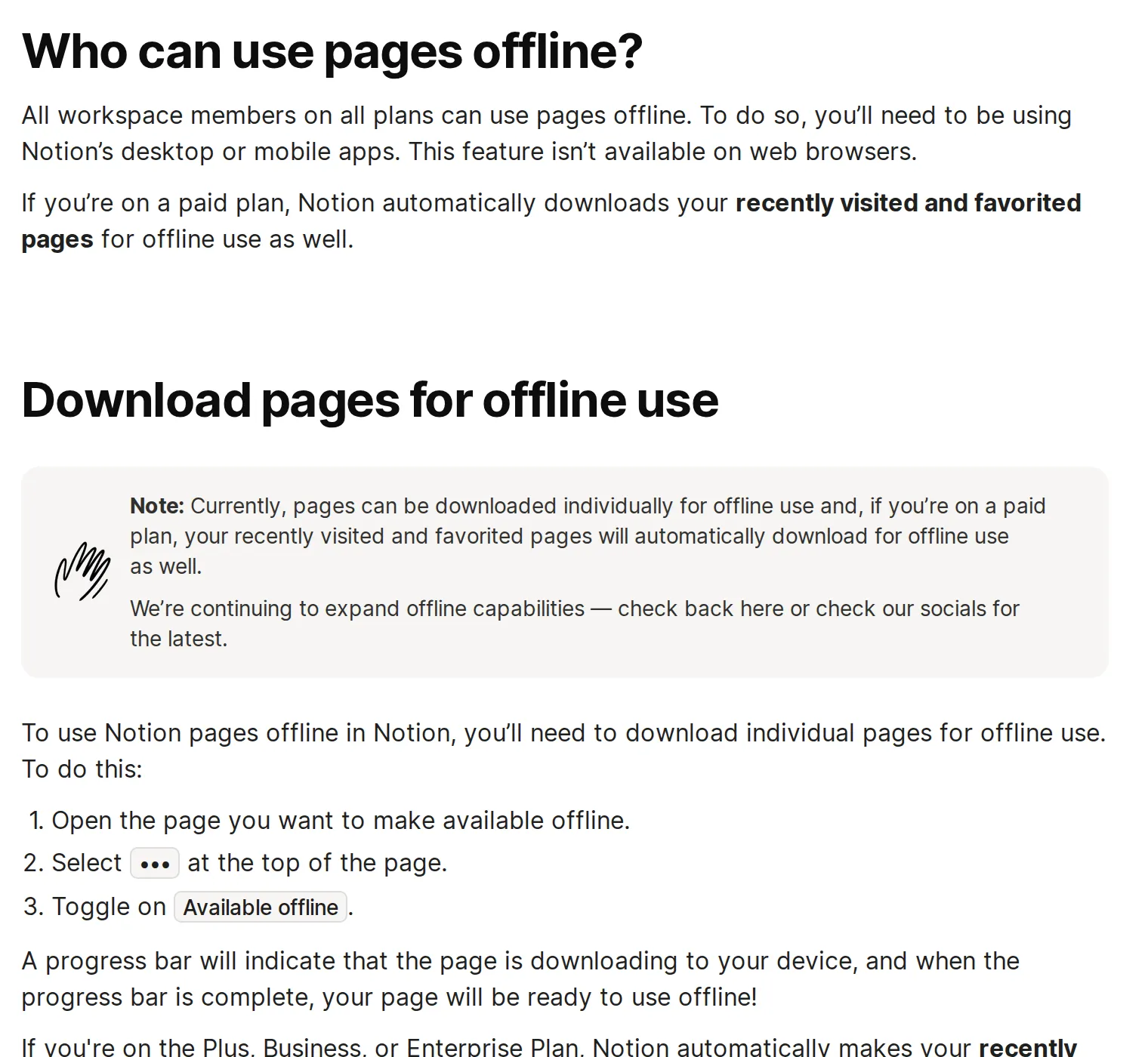 Notion’s offline help page on 10 November 2026. Source: notion.com
The same page lists the catches. On the Plus, Business and Enterprise plans, recently visited and favorited pages download by themselves; on the free plan you choose each one. A downloaded database brings “the first 50 rows of the first view”, subpages don’t come along, and embeds, AI blocks, forms and buttons need a connection. That’s fine for reading a trip plan offline. It isn’t an offline notes app.
The best offline notes apps compared
What “account” means below: whether you have to sign up before you can write a note.
| App | Account to start | Where notes live | Works offline | Platforms |
|---|---|---|---|---|
| Obsidian | No | Markdown files in a folder | Everything | Windows, Mac, Linux, iPhone, Android |
| Joplin | No, sync is optional | A database on your device | Everything | Windows, Mac, Linux, iPhone, Android |
| Standard Notes | No, local use allowed | On your device, encrypted with a passcode | Everything | Desktop, phone, web |
| Markor | No | Text files in a folder | Everything | Android |
| Apple Notes, On My iPhone | No iCloud needed | On the iPhone only | Everything | iPhone |
| VB Notes | No | Markdown files in a folder | Everything, search included, after a one-time model download | iPhone, Android, Mac, Windows, Linux |
| Notion | Yes | Notion’s servers | Pages you download, app only | Desktop, phone, web (not offline) |
| Evernote | Yes | Evernote’s servers | Offline notes on every plan | Desktop, phone, web |
| Simplenote | Yes, with email check | Simplenote’s servers | Notes downloaded while signed in | Phone, desktop, web |
| Google Keep | Yes | Google’s servers | Phone apps only | Phone apps, computer |
Obsidian: the default for files you own
Obsidian “stores your notes as Markdown-formatted plain text files in a vault”, and a vault is “a folder on your local file system” (Obsidian help). With no server in the way, there’s nothing to go offline.
Its pricing page says “No sign-up required” and calls the app “Free without limits”. You pay only if you want Obsidian Sync, at $4 a month billed annually or $5 billed monthly. It runs on Windows, Mac, Linux, iPhone and Android (downloads). If you’d rather not pay for sync, iCloud Drive, Syncthing or Git can move the vault, as I set out in syncing Obsidian without paying.
The catch is that Obsidian is a blank workshop. Plugins, settings and a vault structure are yours to build.
Joplin: a notebook app that syncs only when you ask
Joplin keeps everything on your device in its own database and runs on Windows, Mac, Linux, Android and iPhone. Sync is something you switch on, to Joplin Cloud, Nextcloud, S3, WebDAV, Dropbox, OneDrive or a local folder (Joplin sync).
It’s the best pick if you like notebooks in a sidebar and want to choose your own sync later. The catch: Joplin’s database.sqlite is “the central SQLite database file where all notes, notebooks, tags, and metadata are stored” (Joplin profile docs), so another app can’t read your notes in place. You export to Markdown when you leave.
Standard Notes: encrypted, with or without an account
Standard Notes “can be used totally offline without an account, and without an internet connection”, and notes made that way stay on the device and don’t sync (Standard Notes help). Set an Application Passcode under Security and the local data gets the same encryption as an account would.
If you do make an account, the free plan includes “Offline access” and sync on unlimited devices, for plain text notes (plans). Markdown, checklists and richer notes are on Productivity, $90 a year. Pick it when privacy is the reason you’re looking.
Markor: plain files on Android
Markor “works completely offline, no internet connection required”, and stores files “in a user selectable folder” (Markor on GitHub). It edits Markdown, todo.txt and plain text, is Apache 2.0 licensed, and comes from F-Droid, where version 2026.10.0 was added on 29 October 2026.
It’s Android only and looks like an editor, not a notebook. For a phone that’s often offline, that’s the point.
Apple Notes: turn on On My iPhone
Apple Notes normally keeps notes in iCloud, but you can add an On My iPhone account “for notes you keep only on this device” (Apple’s iPhone guide). Go to Settings, then Apps, then Notes, and turn on “On My iPhone” Account.
Apple says notes in it “appear only on your iPhone” and are included in your iPhone backups to iCloud, and that every Notes feature in its guide works with this account. The trade: they don’t reach your Mac or anything else.
VB Notes: files on the device, search included
VB Notes keeps each note as a plain .md file in a folder you choose, with no account and no server of its own (notes folder guide). The first time it opens on iPhone it offers On this iPhone as one choice, and on Android a folder on the phone. It’s free on iPhone, on Android, and on Mac, Windows and Linux.
What sets it apart offline is search. Search by meaning, which finds “Rent split with Arjun” when you ask “what does my flatmate owe me”, runs on a small model on your device. It downloads once, then works with no connection, and your notes are never sent anywhere to be searched (search guide). On the desktop the model is about 380 MB, a one-time download.
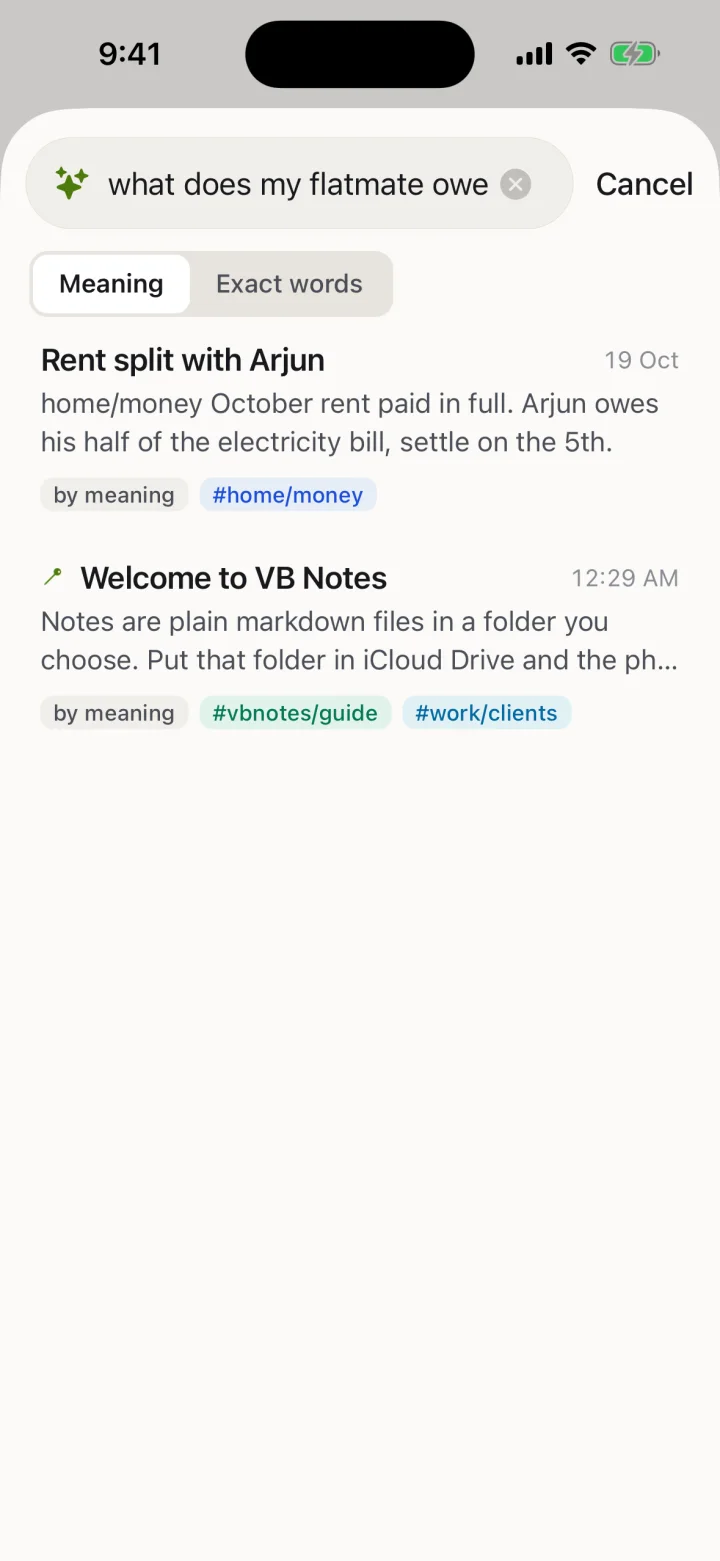 Search by meaning in VB Notes, which runs on the phone.
What it lacks: no web app, no sharing, no encryption of its own, and no sync service. Mermaid diagrams need a connection the first time they’re drawn; offline, the block shows its code (writing guide). If you want the notes on a second device, the folder has to travel by iCloud Drive or a sync app.
Cloud apps with an offline mode
Evernote lists “Offline notes” on every plan, Free included. The Free plan, though, stops at 50 notes, one notebook and one device (Evernote plans).
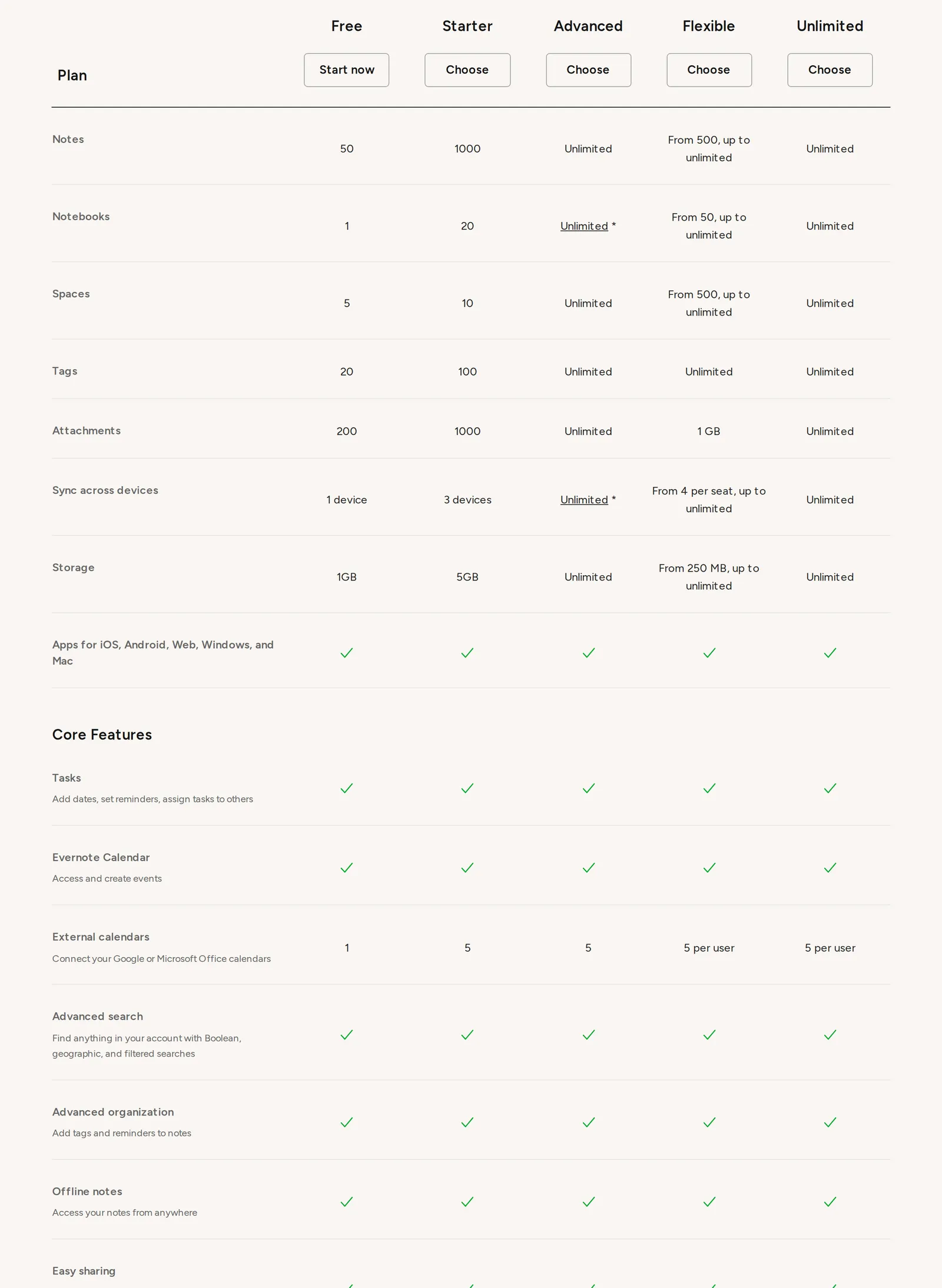 Evernote’s plan comparison on 10 November 2026. Source: evernote.com
Google Keep is the one to watch. Its FAQ says “Offline access to notes is available on Keep mobile apps, but not on your computer” (Keep help). On a laptop with no Wi-Fi, Keep in the browser won’t help.
Simplenote needs an account before anything else: its help says “there is not a way to use Simplenote without creating an account”, and sign-up needs email verification (Simplenote help). The apps work offline once you’ve signed in and your notes have downloaded.
How to test an app before you trust it
- Install the app and make a few notes, including one with a picture.
- Turn on airplane mode and force-quit the app.
- Open it again. Read an old note, edit it, make a new one, and search for a word in it.
- Turn the connection back on and check that the edit reached your other device, if you sync.
If step 3 shows a spinner or a login screen, it’s an offline mode, not an offline app.
FAQ
What is the best free offline notes app?
Obsidian on computers and phones, Joplin if you want notebooks and optional sync, and Markor on Android. All three are free, need no account and keep every note on your device.
What is the best offline notes app for Android?
Markor for plain text files, Obsidian for linked Markdown notes, and Joplin for notebooks. Google Keep works offline in its Android app, but not on a computer.
What is the best offline notes app for Windows?
Obsidian or Joplin. Both run on Windows with no account, and Obsidian keeps notes as files you can open in any editor. Google Keep has no offline access on a computer.
Does Apple Notes work offline?
Yes. For notes that never leave the phone, turn on the On My iPhone account under Settings, Apps, Notes; those notes stay only on that iPhone and are included in its iCloud backups.
Does Notion work offline?
Partly. In the desktop and mobile apps you can mark pages as Available offline on any plan, and paid plans also download recent and favorited pages, but databases bring only their first 50 rows and the browser version doesn’t work offline.
If your notes already live in Notion or Evernote and you’re offline only on the odd flight, download what you need and stay put. If you’re offline often, or you’d rather no company hold the only copy, move to an app that writes to your own device first, and keep that folder in your backups.