
Obsidian iCloud Sync: Setup, Fixes and the Windows Problem
Disclosure: VB Notes is my app. I’ve tried to be fair, and I say where the others are the better choice.
Obsidian iCloud sync works, and it’s free, as long as every device is an iPhone, iPad or Mac. Put the vault inside the Obsidian folder in iCloud Drive, keep that folder downloaded on the Mac, and never run a second sync service on the same vault. Add a Windows PC and the advice changes: Obsidian’s own help says iCloud Drive on Windows “may lead to file duplication or corruption” (Obsidian help).
How to set up an Obsidian vault in iCloud
Obsidian lists iCloud as a recommended sync method for macOS, iOS and iPadOS, next to its paid Obsidian Sync. First make sure iCloud Drive is on: on the iPhone under Settings → [your name] → iCloud → iCloud Drive, and on the Mac under System Settings → Apple ID → iCloud → iCloud Drive.
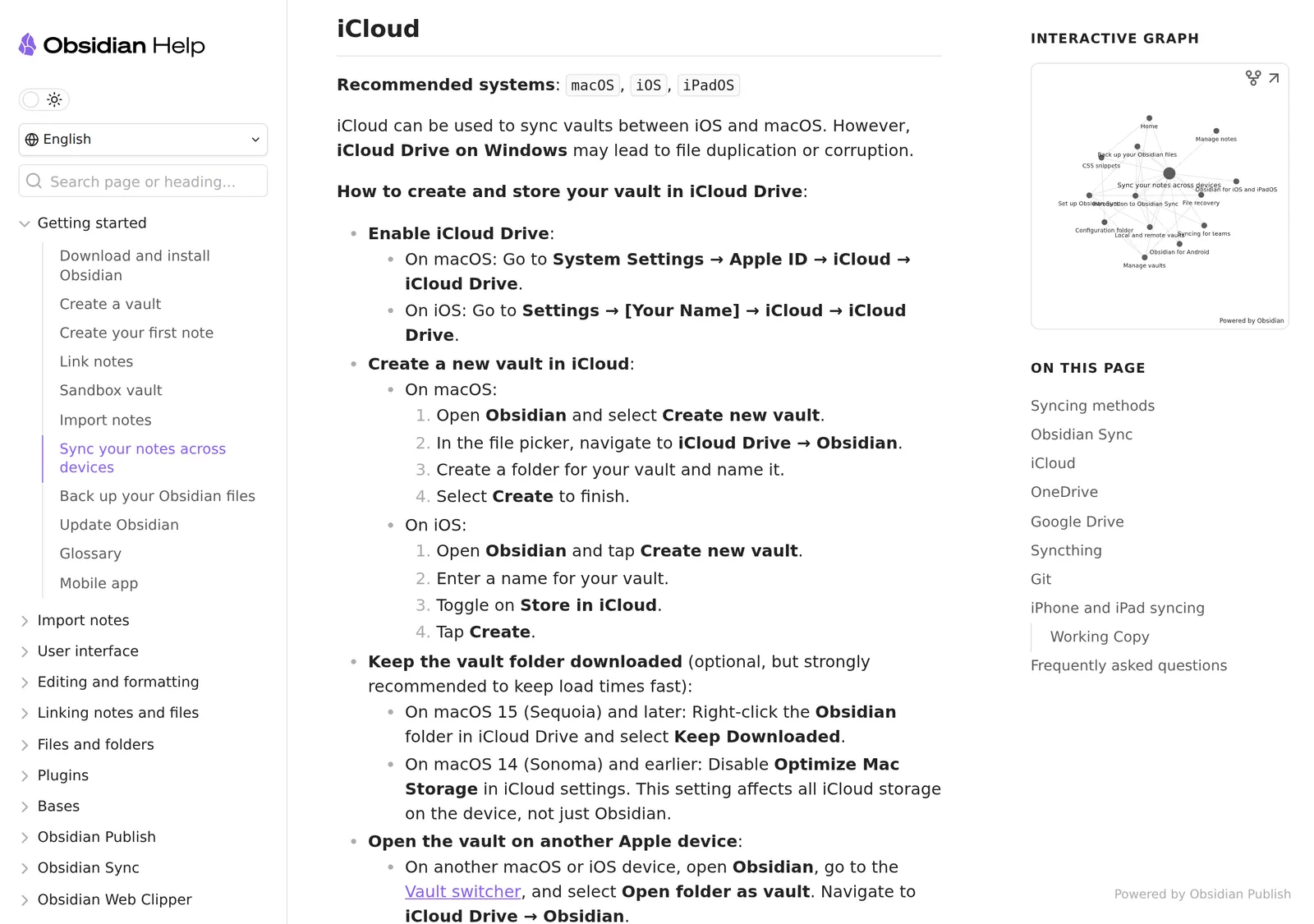 The iCloud section of Obsidian’s sync guide, 8 November 2026. Source: obsidian.md
1. Create the vault in the right folder
On the iPhone, open Obsidian, tap Create new vault, give it a name, turn on Store in iCloud and tap Create. On a Mac, choose Create new vault and, in the file picker, go to iCloud Drive → Obsidian and make the vault’s folder there.
Obsidian’s help says the vault must sit at iCloud Drive/Obsidian/[Your Vault Name], inside the Obsidian folder that shows the app’s icon, not a plain folder with the same name. A vault anywhere else may not sync properly. To check on the iPhone, open the Files app, tap Browse, then iCloud Drive, and look for your vault inside Obsidian.
2. Open it on your other devices
On the second Mac, iPhone or iPad, open Obsidian, go to the vault switcher, choose Open folder as vault and go to iCloud Drive → Obsidian.
3. Keep the vault downloaded on the Mac
iCloud saves disk space by moving files you haven’t opened in a while off the Mac. Obsidian needs every file in the vault on disk, and its help calls keeping the folder downloaded “optional, but strongly recommended”.
On macOS 15 Sequoia and later, Control-click the Obsidian folder in iCloud Drive and choose Keep Downloaded. Apple’s guide says a file pinned that way stays on the Mac even when Optimize Mac Storage moves older documents to iCloud, and that Download Now in the same menu brings back a single file that’s only in the cloud (Apple Mac help). On macOS 14 Sonoma and earlier there’s no per-folder option, so Obsidian tells you to turn off Optimize Mac Storage, which affects all iCloud storage on that Mac.
Moving a vault you already have
If your vault lives elsewhere, close it first. In Obsidian, open the vault profile menu at the bottom left, choose Manage Vaults…, close the vault’s window, then use More options → Move vault and pick a new folder inside iCloud Drive → Obsidian (Obsidian help). Back the vault up first, and let iCloud finish uploading before you open it on the phone.
Obsidian iCloud sync not working: the usual causes
When a vault stops syncing, the cause is usually one of these.
The vault isn’t in the Obsidian folder
If the vault doesn’t show up on the iPhone at all, this is the first thing to check. Move it into iCloud Drive/Obsidian, using the steps above.
Files are in iCloud but not on the device
A file with a cloud icon beside it in Finder or the Files app is in iCloud, not on the device. Obsidian’s FAQ says that when iCloud or OneDrive offloads files, Obsidian can’t access them, which causes sync issues. On the Mac, Keep Downloaded on the Obsidian folder fixes it.
“Waiting for iCloud to synchronise configuration files”
This message used to loop on iPhones; one forum thread from April 2024 describes it popping up every few seconds. Obsidian 1.8.3 for mobile changed this: “We no longer wait for iCloud to finish syncing your configuration files,” and an offloaded config file is downloaded again with a prompt to reload (Obsidian changelog). If you still see it, update the app from the App Store.
Duplicate notes with “(1)” in the name
When two devices write the same file before iCloud catches up, you get a copy. In a long Obsidian forum thread from December 2021, users describe notes and even .obsidian/workspace files copied with “(1)” at the end, and daily notes created twice because the phone made today’s note before the iCloud copy from the other device arrived. Their fixes: delete the duplicates, and turn off “open daily note on startup” on the phone if a daily note keeps doubling. Compare the two copies before you delete one.
Two sync services on one vault
Obsidian’s help is explicit: don’t sync the same vault with Obsidian Sync and iCloud at the same time, because it can cause “data conflicts or corruption”. The same goes for a Dropbox or Git setup pointed at an iCloud vault. Pick one.
Obsidian sync between Windows and iPhone with iCloud
An iPhone with a Windows PC is the combination iCloud handles worst. In the December 2021 forum thread, Windows users reported slow uploads and duplicated folders, and Obsidian’s help still warns against it.
If you go ahead anyway, pin the vault so iCloud for Windows keeps it on the PC: in File Explorer, click iCloud Drive, right-click the vault folder and choose Always keep on this device (Apple’s iCloud for Windows guide). Apple notes that this option isn’t available in iCloud for Windows version 7. Keep a backup, and expect to clean up the odd duplicate.
Obsidian’s own way to cover Windows, iPhone and Android is Obsidian Sync, at $4 a month billed yearly or $5 monthly (Obsidian pricing). The Standard plan covers one vault, 1 GB of storage and files up to 5 MB, with a month of version history (Sync plans). For the free routes, such as Syncthing and Git, and which ones reach an iPhone, see my guide on syncing Obsidian without paying.
What iCloud costs, and what it doesn’t do
iCloud comes with 5 GB free, and a plain-text vault fits in that for a long time. The first paid tier in the US is 50 GB for $0.99 a month (Apple support).
Sync isn’t a backup. Obsidian’s backup guide puts it plainly: “Syncing keeps your notes updated, but it doesn’t protect against data loss.” A note deleted on the phone is deleted on the Mac a moment later. The same guide suggests Time Machine to an external drive on a Mac, and its File recovery plugin keeps snapshots, but only per device and only for a limited amount of data.
A second app on the same iCloud vault
Because the vault is a plain folder of .md files, other apps can open it too, if you want a simpler editor for quick notes on the phone.
VB Notes is one of them. On the iPhone, open Settings › Notes folder › Location, pick your vault inside iCloud Drive › Obsidian, and choose to open the folder as it is (notes folder guide). Your notes appear with nothing to import, in an editor that shows formatting as you type, and [[Note title]] links are written the way Obsidian writes them (writing guide). Obsidian keeps reading the same files, so plugins and the graph stay on the Mac.
Know what it won’t do. VB Notes has no plugins, graph view or backlinks panel, and it adds a small .vbnotes folder for pins and tag icons. Notes you create in it are named after their first line. On Windows it would read the vault through the same iCloud for Windows folder, so Obsidian’s warning applies there too.
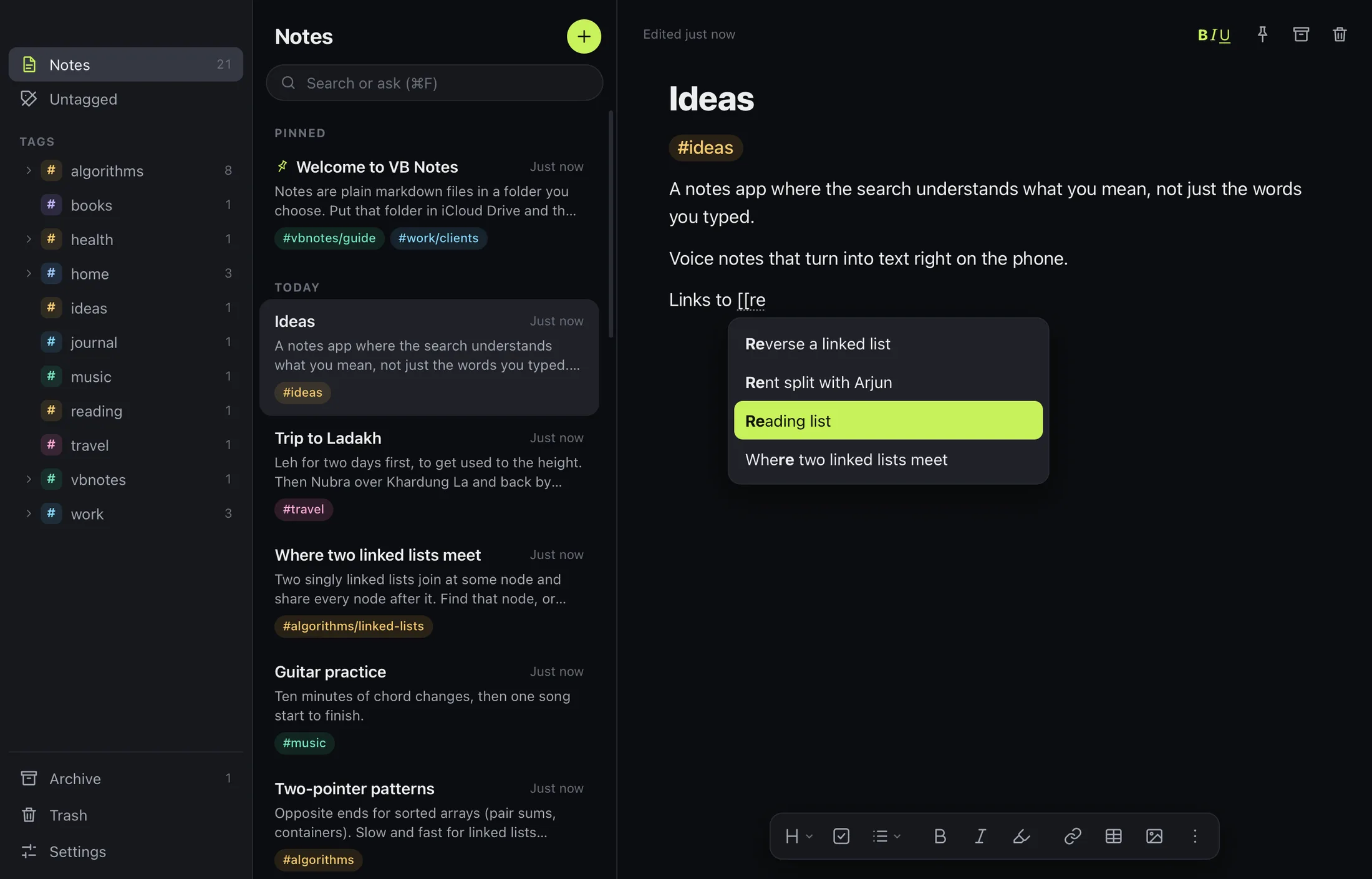 Writing a
[[ link in VB Notes on the desktop. Source: VB Notes docs
FAQ
Is Obsidian iCloud sync free?
Yes. Obsidian is free, iCloud Drive’s sync is free, and iCloud includes 5 GB of storage at no cost, which holds a large text vault. You only pay if your iCloud storage fills up or you choose Obsidian Sync.
Why is my Obsidian iCloud vault not showing on my iPhone?
Usually iCloud Drive is off on one device, or the vault isn’t inside the Obsidian folder in iCloud Drive. Open the Files app, go to iCloud Drive, and check the vault sits in the folder named Obsidian that shows the app’s icon. If it’s elsewhere, move it there.
Can I use Obsidian iCloud sync on Windows?
You can install iCloud for Windows and open the vault from iCloud Drive, but Obsidian warns that it may lead to file duplication or corruption. Pin the folder with “Always keep on this device” and keep backups, or use Obsidian Sync or another method for Windows.
Is iCloud or Obsidian Sync better for Obsidian?
iCloud is better if you only use Apple devices and want to pay nothing. Obsidian Sync is better if you use Windows, Android or Linux, or want version history, and it costs $4 a month billed yearly.
Can I use iCloud and Obsidian Sync together?
No. Obsidian’s help says to avoid syncing the same vault with more than one service at once, because it can cause conflicts or corruption.
If every device you own has an Apple logo, iCloud is the right answer and costs nothing: set it up once, pin the folder on the Mac, and leave it alone. If a Windows PC or an Android phone is in the picture, don’t fight iCloud. Pay for Obsidian Sync or use one of the free methods built for mixed devices.