
Bear vs Obsidian: Editor, Files, Sync and Price Compared
Disclosure: VB Notes is my app. I’ve tried to be fair, and I say where the others are the better choice.
In Bear vs Obsidian, the deciding question is where your notes live. Bear keeps them in a database on Apple devices and syncs them through iCloud for $29.99 a year, and in return you get a calm editor that needs no setup. Obsidian keeps them as plain Markdown files in a folder, runs on Windows, Linux and Android too, costs nothing unless you buy its sync, and has thousands of plugins. Pick Bear if you write on Apple devices only and want to stop fiddling. Pick Obsidian if you need Windows or Android, a graph of your notes, or files other tools can read. You can’t really use both on the same notes.
Bear notes vs Obsidian at a glance
Prices were checked on 4 November 2026 and are US prices.
| Bear | Obsidian | |
|---|---|---|
| Runs on | iPhone, iPad, Mac, Apple Watch, Vision Pro; Bear Web in beta | Windows, Mac, Linux, iPhone, iPad, Android |
| Where notes live | A SQLite database inside the app | Plain .md files in a folder you pick |
| Sync | iCloud, with Pro | Obsidian Sync, iCloud Drive, Syncthing, Git and others |
| Price | Free without sync; Pro $2.99 a month or $29.99 a year | Free; Sync from $4 a month billed yearly |
| Extending it | BearCLI and an MCP server | 9,888 community plugins |
| Links | [[Note]], headings as [[Note/Heading]] |
[[Note]], headings as [[Note#Heading]] |
| Tags with spaces | #meeting notes# |
Not allowed |
| Backlinks and graph | Backlinks tab, no graph | Backlinks and a graph view |
Storage: Bear’s database vs Obsidian’s folder
Bear’s help is plain about it: on iPhone and Mac, notes are stored in a SQLite database. On iOS you can’t reach that database at all. On a Mac you can read it, though Bear highly recommends against editing it.
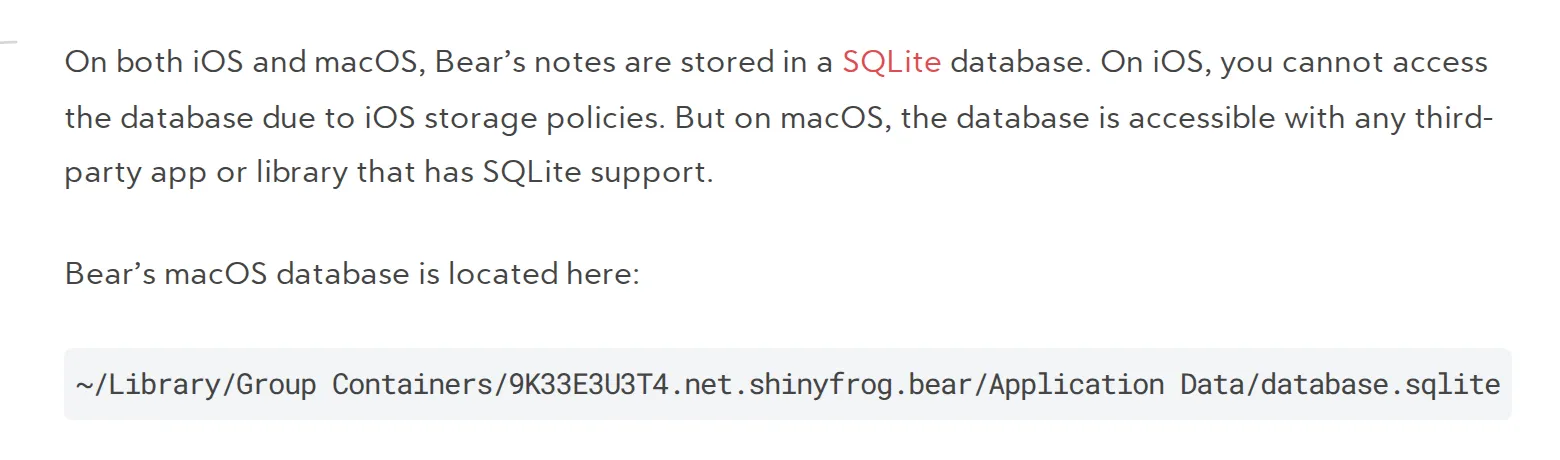 Bear’s help page on where notes are stored, 4 November 2026. Source: bear.app
Obsidian is the opposite. It stores notes as Markdown plain text files in a vault, which is just a folder on your disk, plus a hidden .obsidian folder for its settings. Any editor, script or backup tool can open those files without asking Obsidian.
Bear has narrowed the gap a little. Bear 2.8 in April 2026 added BearCLI, which lets a terminal or script read, search, create and edit notes, and an MCP server for tools such as Claude Code. That’s access through Bear, though, not files you own.
Links and plugins: Bear’s polish vs Obsidian’s setup
Bear’s appeal is that it works the moment you open it. Typing [[ brings up your notes, and links can point at a heading or carry an alias after a |. A Backlinks tab lists every note that links to the one you’re reading, plus unlinked mentions of its title (Bear help).
Obsidian gives you more and asks more of you. Its graph view draws the links between all your notes, and the community directory lists 9,888 plugins and 975 themes. That’s the honest win for Obsidian: templates, daily notes, queries and a graph are a setting or a plugin away.
One user who went from Bear back to Obsidian in June 2025 put it simply: “Having a pile of files feels future-proofed.”
Sync and price
Bear Pro is $2.99 a month or $29.99 a year on the US App Store. One subscription covers every device on the same Apple ID, and sync is the main thing you’re paying for: Bear Pro adds iCloud sync, along with encryption, PDF and Word export and extra themes.
Bear syncs through Apple’s CloudKit, so there’s no separate account. Obsidian’s app is free without limits, with no sign-up. Its own sync is the paid part.
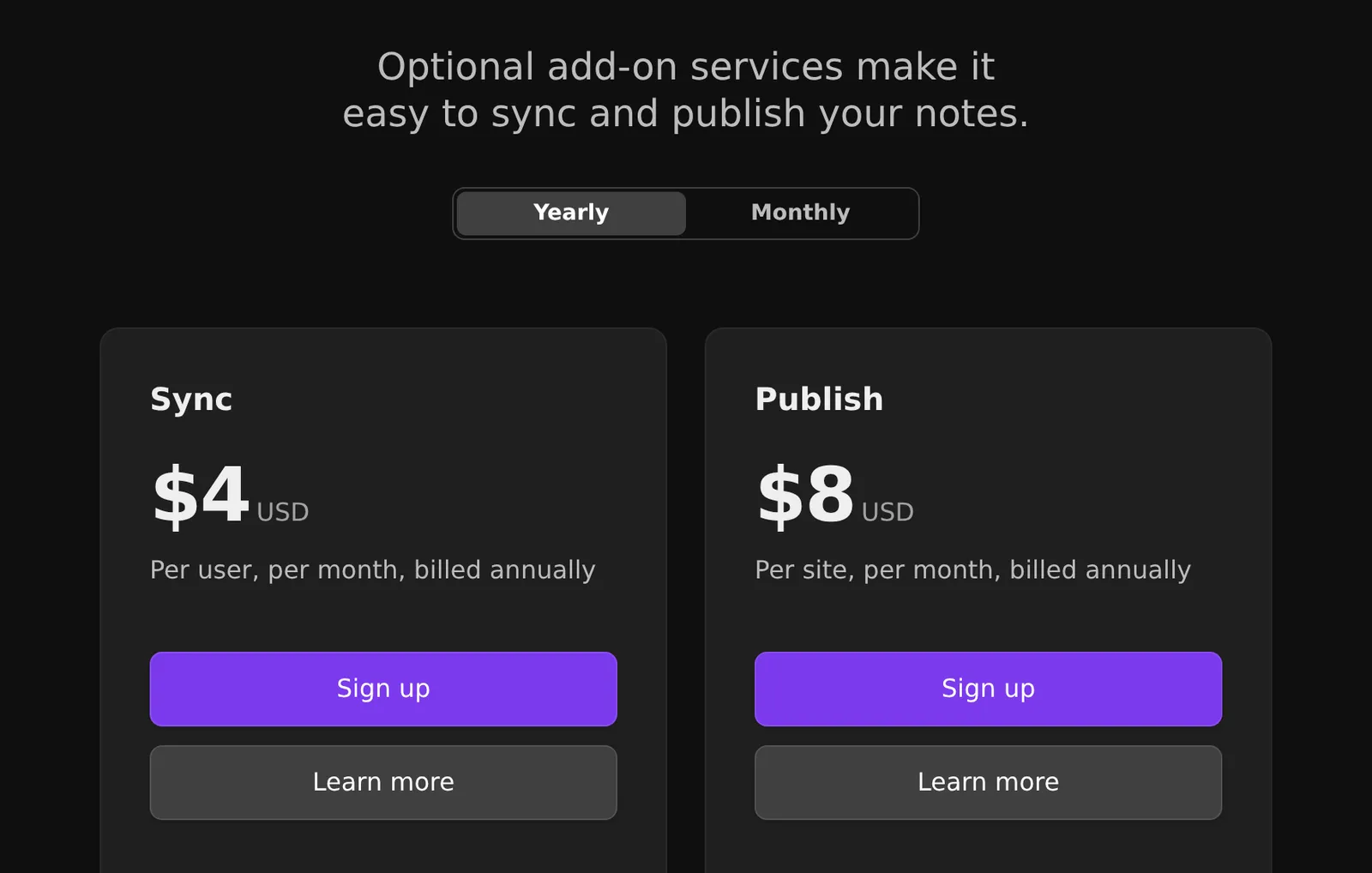 Obsidian’s pricing page on 4 November 2026, in US dollars. Source: obsidian.md
Sync Standard is $4 a month billed yearly or $5 monthly, for one vault and 1 GB. Sync Plus is $8 or $10, for ten vaults and 10 GB. Publish is $8 a site a month billed yearly. A Commercial licence costs $50 a year, but paying for work use isn’t required.
You can skip Obsidian Sync. Its sync guide recommends iCloud Drive between iPhone and Mac, and Syncthing or Git on the desktop. Two warnings from that page matter: iCloud Drive on Windows “may lead to file duplication or corruption”, and you shouldn’t sync one vault with two services at once.
Platforms, including Bear Web
Obsidian has apps for Windows, macOS, Linux, iOS and Android. Bear is Apple only: iPhone, iPad, Apple Watch and Vision Pro, plus the Mac on macOS 12.4 or later.
The exception is Bear Web, a public beta since July 2025 at web.bear.app. You sign in with your Apple ID, it doesn’t need Pro during the beta, and Pro will be needed once it leaves. Bear’s ten-year post on 3 November 2026 says the full release is “almost here”. Bear itself warns against relying on the beta for critical work.
Moving from Bear to Obsidian
Back up your notes in Bear (on a Mac, File > Backup notes gives a .bear2bk file; on iPhone, Settings > Advanced > Share Application Data gives a .zip). Then install Obsidian’s Importer plugin and choose Bear as the format (Obsidian help).
The Importer’s code shows what happens to the awkward parts:
- Tags with spaces such as
#meeting notes#become#meeting_notes, because Obsidian tags can’t contain spaces. - Nested tags like Bear’s
#recipes/italianstay nested, since Obsidian uses the same slash. One switch moves tags out of the text into the note’s properties, and another splits nested tags into separate ones there. - Encrypted notes in an iPhone
.zipare skipped. A Mac backup keeps them in their encrypted form (Bear help), so decrypt them in Bear first. - Archived and trashed notes land in
archiveandtrashfolders inside the import (Importer code).
Links need a look afterwards. Plain [[Note]] links and | aliases work in both apps, but Bear writes a heading link as [[Note/Heading]] and Obsidian expects [[Note#Heading]]. Search your vault for [[ with a slash inside and fix those by hand.
Moving from Obsidian to Bear
On a Mac, Bear has File > Import From > Obsidian: pick the vault folder and it brings in notes and attachments (Bear help). Inline #tags and tags in YAML come across. Tags added by plugins or scripts don’t, and images linked from the web aren’t downloaded. If a plugin builds part of your notes, such as daily notes or queries, check how much of it you’d be leaving behind.
The middle option: Bear’s editor on Obsidian’s files
Some people want Bear’s way of writing with Obsidian’s folder and a Windows or Android app. That’s the gap I built VB Notes for. Point it at your Obsidian vault and you write in an editor that shows formatting as you type, with [[Note title]] links stored the way Obsidian writes them and nested tags like #work/clients. Obsidian keeps reading the same files, so you can leave it on the desktop for plugins and the graph.
Bear-style #reading list# tags work in VB Notes too, but Obsidian won’t read them as one tag, so keep to one-word tags in a shared vault. VB Notes runs on iPhone, Mac, Windows, Linux and Android, and it’s free.
The folder is the sync: iCloud Drive between iPhone and Mac, or a sync app such as Syncthing on Windows and Android. Obsidian still beats it on plugins and the graph, and VB Notes has no backlinks panel, no iPad-specific version and no web app. On iPhone it can’t open Dropbox or Google Drive folders.
FAQ
Can Bear and Obsidian sync the same notes?
No. Bear keeps notes in its own database, and its importer and exporter make copies, so edits in one app never reach the other. Pick one app as home, or use an app that reads the Obsidian vault directly.
Is Bear better than Obsidian?
For writing on Apple devices with no setup, I’d pick Bear. Obsidian is better if you need Windows, Android or Linux, plugins, a graph view, or plain files.
Can I move my notes from Bear to Obsidian?
Yes. Back up your notes in Bear, then open the .bear2bk or .zip file with Obsidian’s official Importer plugin. Decrypt locked notes in Bear first, and fix heading links by hand afterwards.
Bear vs Obsidian vs Apple Notes: which should I pick?
Stay with Apple Notes if its formatting is enough, pick Bear for Markdown and tags without leaving Apple devices, and pick Obsidian if you need Windows, Android or plain files. Either can take your Apple Notes: Bear imports a Markdown folder exported from Notes on macOS 26 or later. Obsidian’s Importer reads Apple Notes directly on a Mac.
Which one to choose
If every device you own is from Apple and Bear’s writing feel is what you love, stay with Bear and make a backup now and then (File > Backup Notes on a Mac). If you’ve outgrown it, need Windows or Android, or want plugins and a graph, move to Obsidian, decrypt your locked notes first, and check your heading links after the import. If you’d rather your notes app were open source, look at the open source Bear alternatives instead.