
Best Private Notes App: Who Can Read Your Notes?
Disclosure: VB Notes is my app. I’ve tried to be fair, and I say where the others are the better choice.
The best private notes app is the one that leaves the fewest people able to read your notes. If you want sync and no company able to read what syncs, pick Standard Notes or Notesnook, which encrypt notes on your device before they upload. If you’d rather no notes company holds anything, keep plain files on your own devices with Obsidian (without its Sync) or VB Notes, and choose the sync service as carefully as the app. Apple Notes is private from Apple only once you turn on Advanced Data Protection.
Three people who might read your notes
“Private” means different things depending on who you’re worried about. It helps to ask three questions of any app:
- The app’s company. Can its staff, or anyone who breaks into its servers, read what you store there?
- The sync service. If the notes travel through iCloud, Dropbox or Google Drive, can that company read them?
- Someone holding your phone, already open. A partner, a child, a colleague who borrowed it for a minute.
Encryption answers the first two. End-to-end encryption means the notes are locked on your device and only your devices hold the key. Encryption “at rest” or “on the server” sounds similar, but the company holds the key, so it can decrypt. The third question is about app locks, and only a few apps put a second lock on the notes that matter.
The apps compared
Prices checked on 11 November 2026, in US dollars.
| App | Can the company decrypt synced notes? | Where synced notes go | Price for sync |
|---|---|---|---|
| Standard Notes | No, end-to-end encrypted | Its servers, encrypted | Free for plain text notes; $90 a year for Productivity |
| Notesnook | No, end-to-end encrypted | Its servers, encrypted | Free; paid plans from $19.99 a year |
| Apple Notes | Yes, Apple holds the keys unless Advanced Data Protection is on | iCloud | Part of iCloud |
| Obsidian | No with Sync’s default; yes with its standard option | Obsidian’s servers, if you buy Sync | $4 a month billed annually (Obsidian pricing) |
| VB Notes | There is no company server | Wherever you put the folder | Free; sync is your folder’s |
Apple Notes: private from Apple only with Advanced Data Protection
Most iPhone owners already have a notes app, so start here. By default, Apple encrypts Notes and iCloud Drive in transit and on its servers, but “the encryption keys from your trusted devices are secured in Apple data centers”, so Apple can decrypt your data (Apple’s iCloud security overview).
Turn on Advanced Data Protection and the number of end-to-end encrypted categories rises from 15 to 25, with Notes and iCloud Drive among the ten added. The keys then live only on your trusted devices.
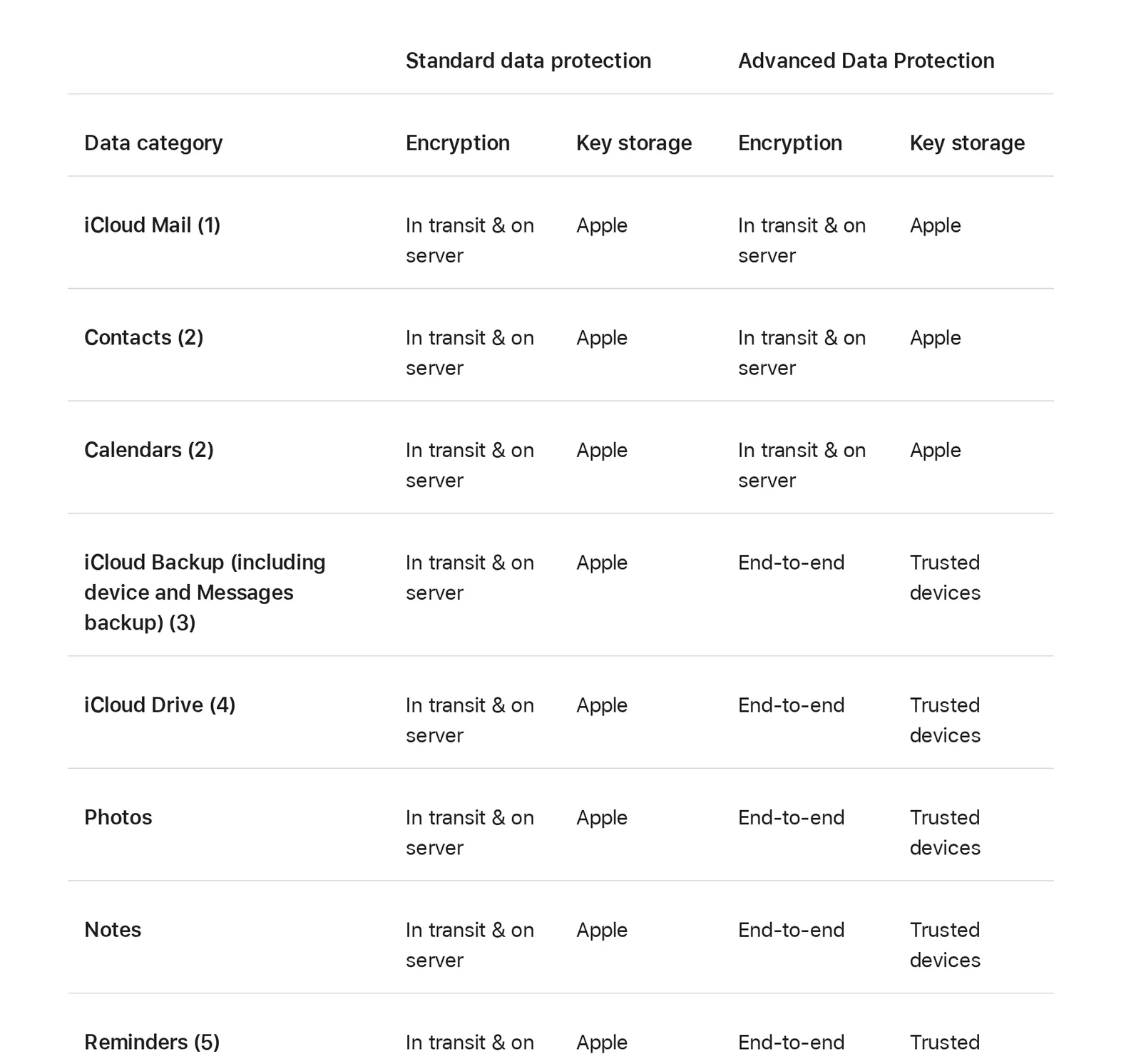 Apple’s iCloud data security overview on 11 November 2026. Source: support.apple.com
It’s in Settings, then your name, then iCloud, then Advanced Data Protection (Apple’s setup guide). You need iOS 16.2 or macOS 13.1 or later on every device, and a recovery contact or recovery key first, because Apple “doesn’t have the encryption keys needed to help you recover your end-to-end encrypted data”. One catch: in the United Kingdom Apple can no longer offer the feature to new users (Apple’s UK notice).
If you’re on an iPhone, already use Notes and live outside the UK, this is the cheapest privacy upgrade there is. It costs nothing and you keep the app you know.
End-to-end encrypted sync: Standard Notes, Notesnook, Joplin
The first two answer the first question with “no” by design, and both work across phones, computers and the web. Joplin can, once you switch it on.
Standard Notes
The free plan already includes end-to-end encryption and sync on unlimited devices, but only for plain text notes. Markdown, rich text and checklists come with Productivity at $90 a year; Professional, at $120, adds 100GB of encrypted file storage (Standard Notes plans). Notes, tags and app data are encrypted with XChaCha20-Poly1305.
It has the longest audit record here: Shackle Labs in 2017, Cure53 in 2019 and 2022, and Trail of Bits in 2020 (Standard Notes audits). The Standard Notes team joined Proton in April 2024, and Proton said then that it “will remain open source” (Proton’s announcement). Its US App Store listing carries Apple’s “Data Not Collected” label (App Store).
Notesnook
Notesnook encrypts notes “before they leave your device”, and its apps and sync server are open source (notesnook.com). The free plan has unlimited notes on unlimited devices, with 50 notebooks and 50 tags. In the US App Store, paid plans start at $19.99 a year, and the Pro plan adds app lock and an encrypted vault (App Store).
On Pro, Notesnook does more than anything else here about the third question. The vault keeps individual notes behind a separate password, so getting into the app doesn’t open them. The app lock (PIN, password, or fingerprint and Face ID on phones) covers the whole app, and it switches off by itself if the plan lapses (Notesnook help).
Joplin
Joplin can encrypt notes, notebooks, tags and attachments end to end, but you switch it on yourself, on one device first, and the master password “cannot be recovered” (Joplin help). If you already use Joplin, turn it on before you think you need it.
Local files: Obsidian and VB Notes
The other way to keep a company out is to give it nothing. These apps keep notes as files on your own device, and no company server sits in the middle.
Obsidian
Obsidian stores notes as “Markdown-formatted plain text files in a vault”, a folder on your own disk (Obsidian help). Its security page says no telemetry is collected and no account is needed, and lists Cure53 audits of the apps in December 2023 and December 2024 and a Trail of Bits audit of Sync in December 2025 (Obsidian security).
If you pay for Obsidian Sync, read the setup screen. End-to-end encryption is the default, but there’s also a “standard encryption” option, and because that key “is stored on company servers, it can be used to decrypt your data” (Obsidian Sync security). The same page adds that Obsidian doesn’t encrypt your local vault.
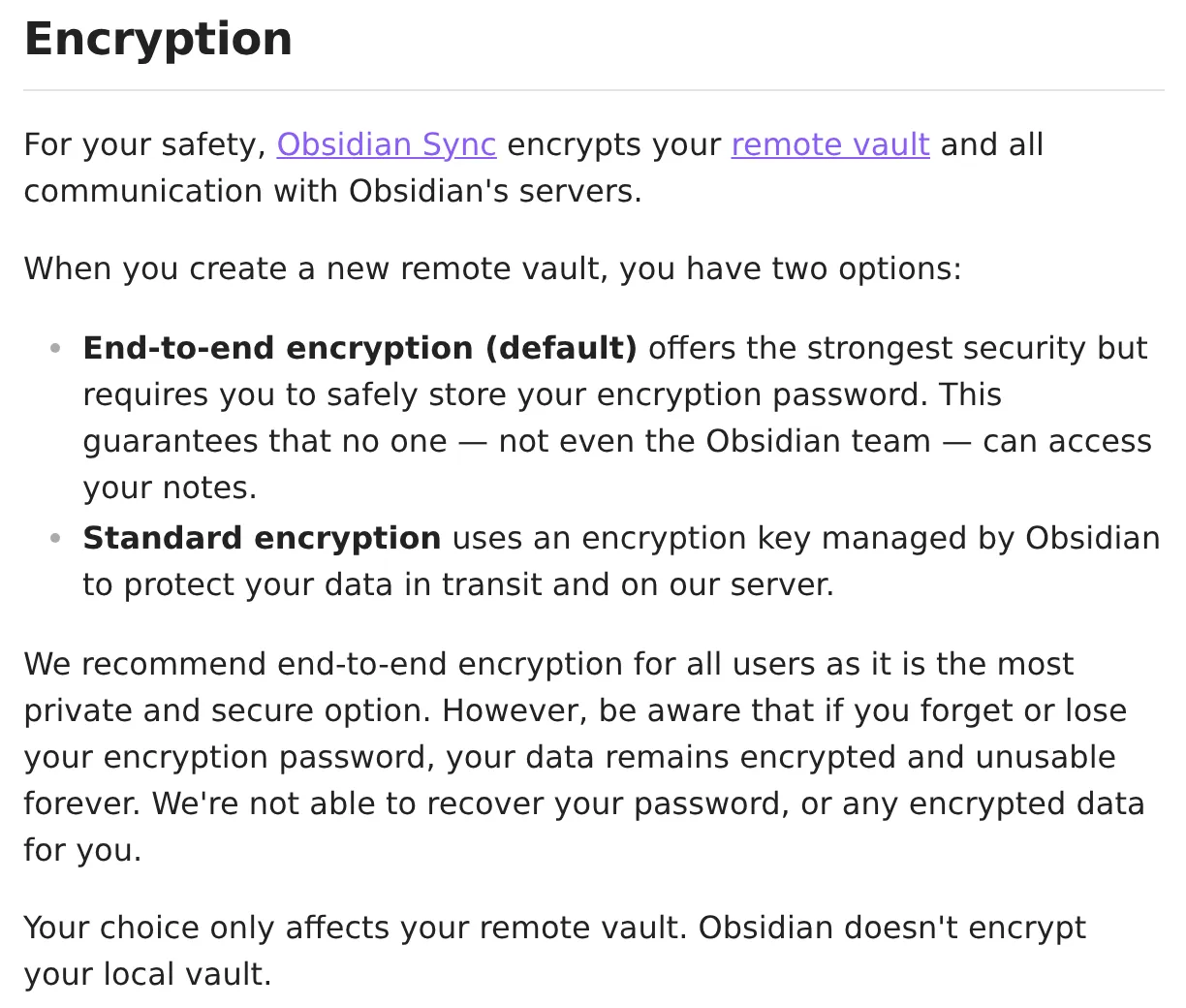 Obsidian Sync’s security page on 11 November 2026. Source: obsidian.md
VB Notes
VB Notes keeps every note as a plain .md file in a folder you pick, with no account and no server of its own (notes folder guide). There is no company copy to read or to leak. Search by meaning runs on a small model on the phone or computer, so your notes and your questions are never sent anywhere to be searched (search guide).
What it doesn’t do: VB Notes doesn’t encrypt files itself, and it has no app lock. Your notes are exactly as private as the folder and the service that syncs it. The optional AI chat is off by default; turned on, it sends the question and the matching parts of notes to the provider you chose.
Your sync service is part of the app
With local files, the second question moves from the notes app to whatever carries the folder.
iCloud Drive is end-to-end encrypted only with Advanced Data Protection on, as above. With it on, an Obsidian vault or a VB Notes folder in iCloud Drive gets the same protection as Apple Notes.
Dropbox offers end-to-end encryption only in encrypted team folders, on its Business Plus, Advanced and Enterprise plans, and only team admins can create them (Dropbox help). Personal plans aren’t on that list.
Syncthing keeps the folder in step between your own devices with no central server. It secures all communication with TLS, and none of your data is stored anywhere but your computers (syncthing.net). On Android that’s how I’d move a notes folder, and the Android sync guide has the steps.
The person holding your phone
Your phone’s passcode does most of the work here. A second lock matters for the moment the phone is open and in someone else’s hand:
- Apple Notes can lock a note with the device passcode or a separate password, end-to-end encrypted for iCloud accounts. You can’t lock notes that have tags, PDFs, audio or video, or shared notes, and if you forget a separate Notes password, Apple can’t get you back in (Apple’s locking guide).
- Notesnook’s vault, behind its own password, and its whole-app lock are the strongest of these, both on Pro.
- Standard Notes has an application passcode (Standard Notes help), and password protection for single notes on the free plan.
- VB Notes has no lock of its own; it relies on the phone’s.
If this is the threat you care about most, Notesnook on Pro is the answer, not a local-files app.
FAQ
What is the best private notes app for iOS?
Apple Notes with Advanced Data Protection turned on, if you’re happy with Notes and live outside the UK. For an app whose company can’t read your notes without any setting to remember, Standard Notes or Notesnook.
What is the best private notes app for Android?
Notesnook, for end-to-end encrypted sync on the free plan and, on Pro, a vault for sensitive notes. If you’d rather no notes company holds anything, Obsidian or VB Notes with Syncthing keeps the folder only on your own devices.
What is the best encrypted notes app for iPhone?
Standard Notes, which encrypts with XChaCha20-Poly1305 and has been audited by Cure53 and Trail of Bits, or Notesnook, whose Pro plan adds a vault behind a second password. Apple Notes becomes end-to-end encrypted with Advanced Data Protection on.
Is Apple Notes end-to-end encrypted?
Not by default: Apple keeps the keys for Notes under standard data protection. Locked notes are end-to-end encrypted, and with Advanced Data Protection on, all notes in iCloud are.
Are local notes apps more private than encrypted ones?
They remove the notes company, but not the sync service or anyone with your device. Files in a personal Dropbox, or in iCloud Drive without Advanced Data Protection, aren’t end-to-end encrypted.
If you already use Apple Notes on an iPhone, turn on Advanced Data Protection and stay put. If you want encrypted sync on every platform, Notesnook or Standard Notes is the better choice than a local-files app. If you’d rather own the files and skip the account, see the notes apps that need no account, then put the folder somewhere end-to-end encrypted.