
Markdown Table: Syntax, Alignment and Why It Won't Render
Disclosure: VB Notes is my app. I’ve tried to be fair, and I say where the others are the better choice.
A markdown table is a header row, a delimiter row of hyphens, and one row per line of data, with pipes (|) between the cells. Put a blank line above it, give the delimiter row three hyphens per column and the same number of cells as the header, and it renders on GitHub, GitLab, Obsidian, Typora and most other apps. Tables were never part of the original Markdown, though, so an app that sticks to the original or to plain CommonMark shows your table as lines of pipes.
Markdown table syntax
This form renders in any app with table support:
| Fruit  | Colour | Price |
| ------ | ------ | ----- |
| Apple  | Red    | 1.20  |
| Banana | Yellow | 0.50  |
The GitHub Flavored Markdown spec defines a table as “a single header row, a delimiter row separating the header from the data, and zero or more data rows” (GFM spec). Spaces around the cell text are trimmed, so the columns don’t have to line up in the file. Lining them up just makes the source easier to read.
The pipes at the start and end of each line are optional on GitHub, and the spec recommends them anyway, for clarity and to avoid ambiguity. I keep them. A table with the outer pipes is easier to scan and harder to break.
Inside a cell you can use inline formatting: links, inline code, bold, italic. GitHub’s own example puts a code span and bold text in cells (GitHub Docs).
Where the syntax came from
John Gruber’s Markdown has no table syntax. His answer for anything Markdown doesn’t cover is “you simply use HTML itself”, and his example of that is an HTML table (Markdown syntax). CommonMark, the spec GitHub’s own spec extends, has no tables section either; it only notes that some implementations added tables (CommonMark 0.31.2).
PHP Markdown Extra documents the same pipe syntax as its own (Markdown Extra), and Pandoc says its pipe table syntax “is identical to PHP Markdown Extra tables” (Pandoc manual). GitHub’s spec defines the same thing as an extension. So “markdown table” really means “the extension most apps agreed on”.
Markdown table alignment
Alignment lives in the delimiter row. A colon on the left of the hyphens left-aligns the column, a colon on the right right-aligns it, and colons on both sides centre it:
| Item   | Qty   | Price |
| :----- | :---: | ----: |
| Coffee |   2   |  3.50 |
| Bagel  |   1   |  2.25 |
A column with no colons gets the app’s default alignment. The colons set the alignment for the whole column, header included; the syntax can’t align a single cell.
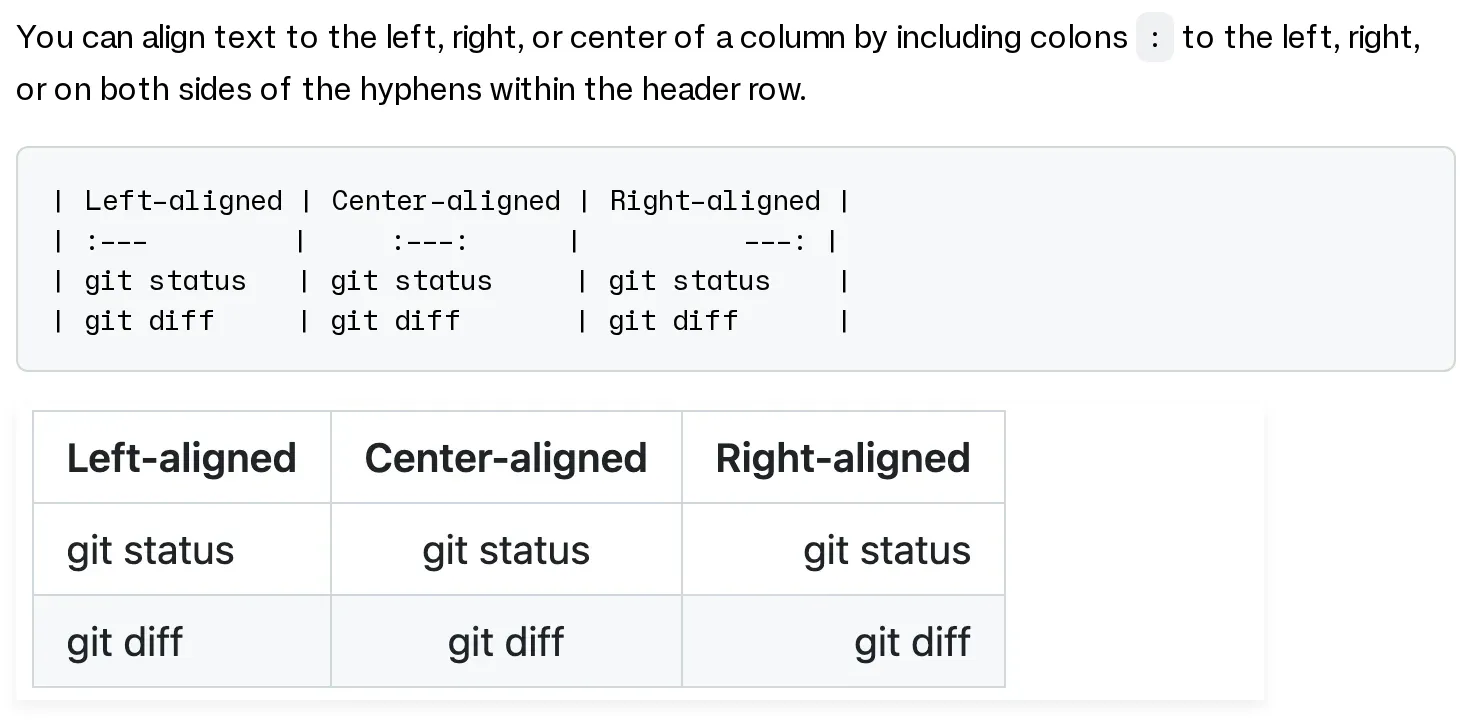 GitHub Docs’ alignment example on 12 November 2026. Source: docs.github.com
Numbers read better right-aligned, so I right-align price and count columns and leave text left-aligned. Centring is mostly useful for short values like ticks or single letters.
Escaping a pipe inside a cell
A | in your text ends the cell. To keep it as text, put a backslash in front: \|. GitHub, GitLab (GitLab docs) and Markdown Extra all document the backslash, and the GFM spec adds the detail that catches people out: you escape it “including inside other inline spans”, which means inside a code span too.
| Shell     | Meaning            |
| --------- | ------------------ |
| `a \| b`  | Pipe a into b      |
| `a \|\| b` | Run b if a fails   |
That looks wrong if you know CommonMark, where “backslash escapes do not work in code spans” (CommonMark spec). In a GFM table cell, though, `a \| b` comes out as a | b in code, as the spec’s Example 200 shows. Forget the backslash and the pipe splits the code span across two cells.
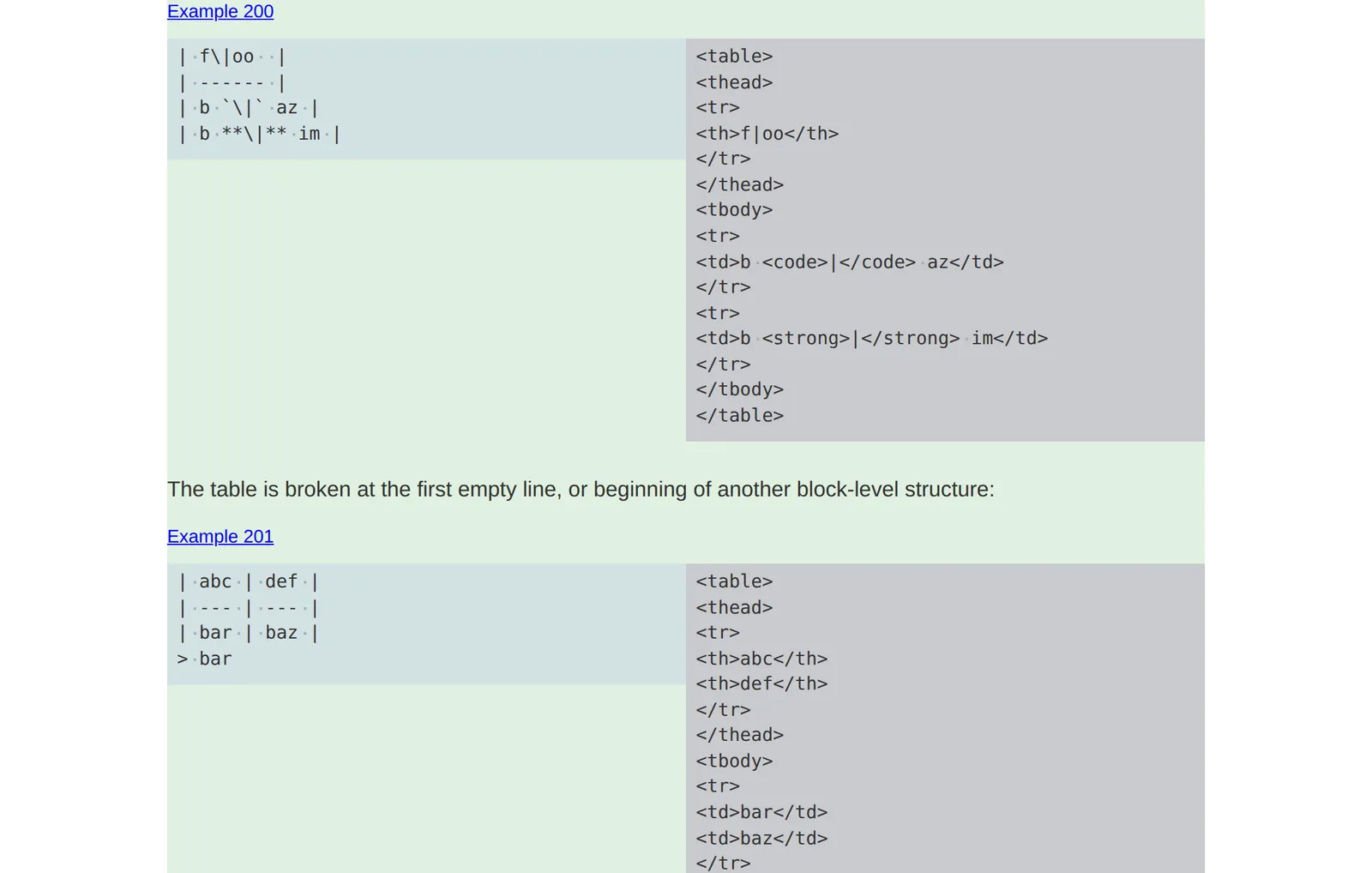 Example 200 of the GitHub Flavored Markdown spec on 12 November 2026. Source: github.github.com
Obsidian has a version of this of its own. A [[Note|alias]] link or a resized image ![[photo.png|200]] both contain a pipe, and Obsidian’s help says to put a \ before the vertical bar when you use either inside a table (Obsidian help).
Markdown table not working: seven causes
When a table shows up as a paragraph full of pipes, it’s almost always one of these.
- The app has no tables. An app that follows Gruber’s original Markdown or plain CommonMark doesn’t render them. Pandoc, for one, switches pipe tables off for its
commonmarkandmarkdown_strictformats. The fix is to switch the app or field to a GFM mode, or to write an HTML table. - No blank line above the table. GitHub’s docs say “you must include a blank line before your table in order for it to correctly render”. If the header row sits right under a line of text, add an empty line between them.
- The header and delimiter rows have different cell counts. The spec says that if they don’t match, “a table will not be recognized”. Body rows are forgiving: missing cells are left empty and extra ones are dropped. The delimiter row is not.
- Too few hyphens for that app. The spec only asks for hyphens, and GitLab wants at least one per cell. Obsidian’s help says at least two, and GitHub’s docs say at least three. Three works in all of them.
- A blank line between rows. The table “is broken at the first empty line”, and a line that starts another block, such as a
>quote, ends it too. Rows after the gap lose their header and turn into text. - An unescaped pipe. A pipe in a code span, a link alias or plain text adds a cell, and it can make a row look broken even though the table renders.
- A line break or list inside a cell. A new line in the file is a new row, so a cell can’t continue onto the next line. The next section covers what to do instead.
Line breaks, lists and merged cells
Pipe tables hold one line per cell. Pandoc puts it plainly: their cells “cannot contain block elements like paragraphs and lists, and cannot span multiple lines”. The GFM spec says the same, “Block-level elements cannot be inserted in a table.”
For a forced line break, GitLab’s docs say you can use an HTML <br> tag in the cell. That’s raw HTML, so check your app’s docs before relying on it anywhere else. A long cell is fine as long as it stays on one line in the file.
There are no merged cells either. The pipe syntax has no rowspan or colspan. You have two ways out:
- Pandoc grid tables. Drawn with
+,-and|, their cells can hold paragraphs, lists and code, and “can span multiple columns or rows”. They’re a Pandoc extension, on by default for Pandoc’s own Markdown and off for itsmarkdown_githuband Markdown Extra formats, so use them only for documents you convert with Pandoc. - An HTML table. Gruber’s page shows one, and it works in any app that renders HTML in markdown. His page also notes that Markdown formatting isn’t processed inside block-level HTML, so write
<strong>instead of**.
If a table needs merged cells or paragraphs in its cells, I’d question whether it should be a table at all. A heading per item with a short list under it often reads better on a phone.
Markdown table generators and editors
Typing pipes and hyphens by hand is fine for three rows and tedious for thirty. A few tools write the markdown for you:
- TablesGenerator.com is a web editor: paste cells from Excel, Google Sheets or LibreOffice Calc, or import a CSV or .xlsx file, set the alignment per column, and copy the GitHub Flavored Markdown it writes below the grid (TablesGenerator).
- GitLab makes a markdown table when you paste from a spreadsheet into its editor.
- Obsidian has an Insert Table command in the Command Palette, and in Live Preview you right-click a table to add, delete, sort or move rows and columns, or to set alignment.
- Typora makes a two-column table when you type
| First Header | Second Header |and press Return, and writes the source for you as you edit (Typora reference).
In VB Notes, you insert a table from the formatting keys rather than typing it, and it shows as a table while you write. In the file it’s a standard markdown table, so apps that read markdown tables, such as Obsidian or Typora, show the same note as a table too (writing guide). You skip the pipe and hyphen counting, and the file still works if you later move to another app.
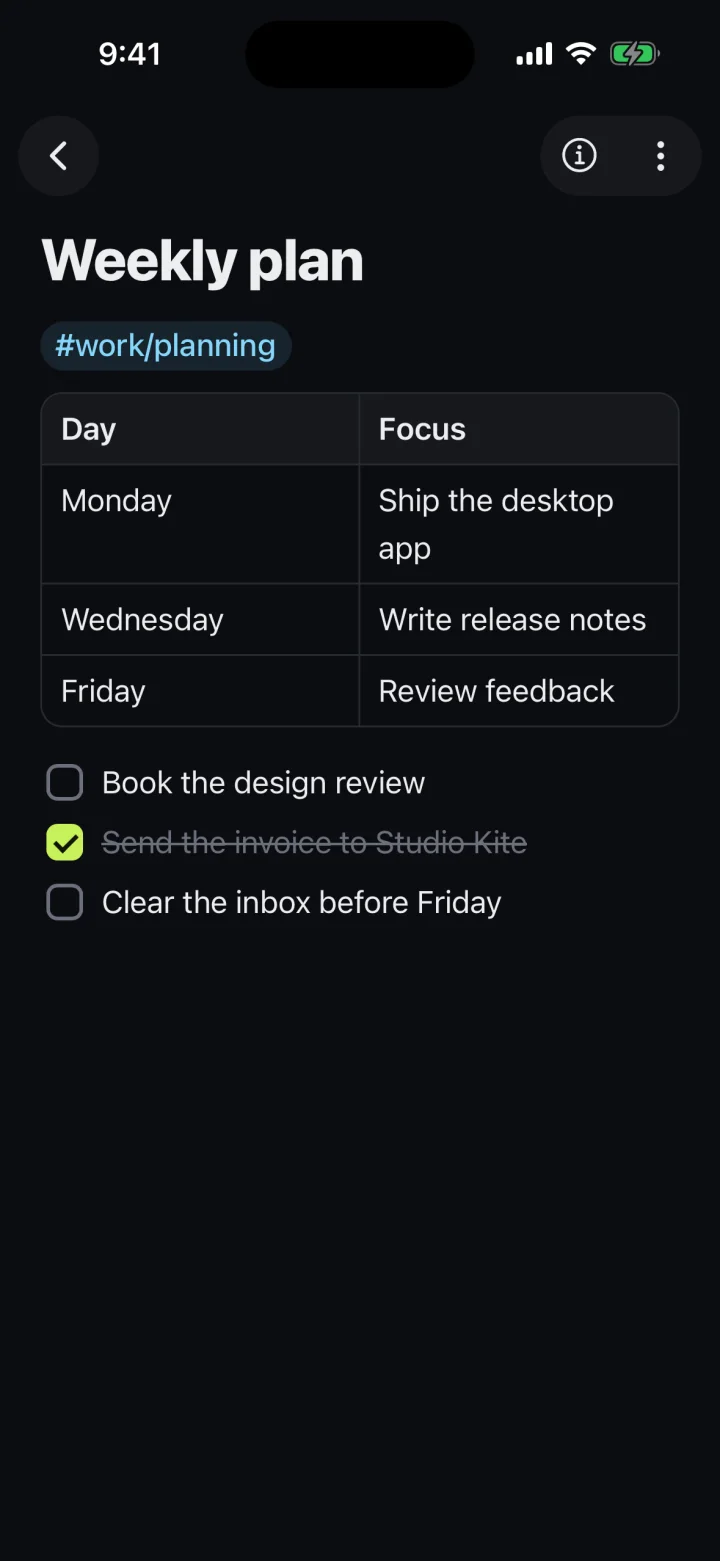 A table in a VB Notes note on iPhone. Source: VB Notes writing guide
If you’re choosing an editor for longer documents with lots of tables, my Windows markdown editor roundup compares Typora, Obsidian, MarkText and others, and the iPhone markdown apps post covers the phone side.
FAQ
What is the markdown table syntax?
A header row, a delimiter row of hyphens, then one row per line, with pipes between cells: | A | B |, then | --- | --- |, then | 1 | 2 |. Leave a blank line above it and keep the header and delimiter rows to the same number of cells.
How do you align columns in a markdown table?
Add colons to the delimiter row: :--- for left, :---: for centre and ---: for right. Alignment applies to the whole column, and a column without colons uses the app’s default.
Why is my markdown table not working?
The usual causes are a missing blank line above the table, a delimiter row with a different number of cells than the header, too few hyphens for the app (GitHub’s docs ask for three), or an app that doesn’t support tables at all. An unescaped pipe inside a cell, even inside backticks, can also split a cell in two.
Is there a markdown table generator?
Yes. TablesGenerator.com turns pasted spreadsheet cells or a CSV file into a GitHub Flavored Markdown table, and editors such as Obsidian, Typora and GitLab insert or convert tables for you.
Can you merge cells in a markdown table?
Not in the pipe syntax most apps use. Use an HTML table with colspan or rowspan, or Pandoc’s grid tables if you convert documents with Pandoc.
If your tables live on GitHub or GitLab, stick to the three-hyphen form above and you won’t need any tool. If you need merged cells, write HTML or use Pandoc. And if you build big tables from spreadsheet data, a generator like TablesGenerator.com will save you more time than any editor.