
Open Source Notes App: 7 Compared by Where Notes Live
Disclosure: VB Notes is my app. I’ve tried to be fair, and I say where the others are the better choice.
The open source notes app most people should try first is Joplin: it’s AGPL-licensed, runs on Windows, Mac, Linux, Android and iPhone, and syncs through Dropbox, OneDrive, Nextcloud or its own cloud. Pick Notesnook or Standard Notes if end-to-end encryption is the point, Simplenote if you want plain and free, and Logseq if you think in outlines. If you want the notes themselves to be plain .md files you can open in any editor, on every platform, VB Notes, my app, does that under the MIT licence. Obsidian isn’t on this list because it isn’t open source.
What “open source” covers, and what it doesn’t
An open licence on the app is the start, not the whole answer. Whether open code protects you depends on whether the sync server is open too, and whether your notes are stored in a form you can carry away.
Joplin shows the first point well. Its licence file puts all the code under AGPL-3.0-or-later, except folders with their own licence. The server is one of those. Joplin Server ships under the Joplin Server Personal Use License, which allows non-commercial use, for personal and professional notes, and needs the author’s written permission for commercial use. That’s fine for one person syncing their own notes, and worth knowing before you build a paid service on it.
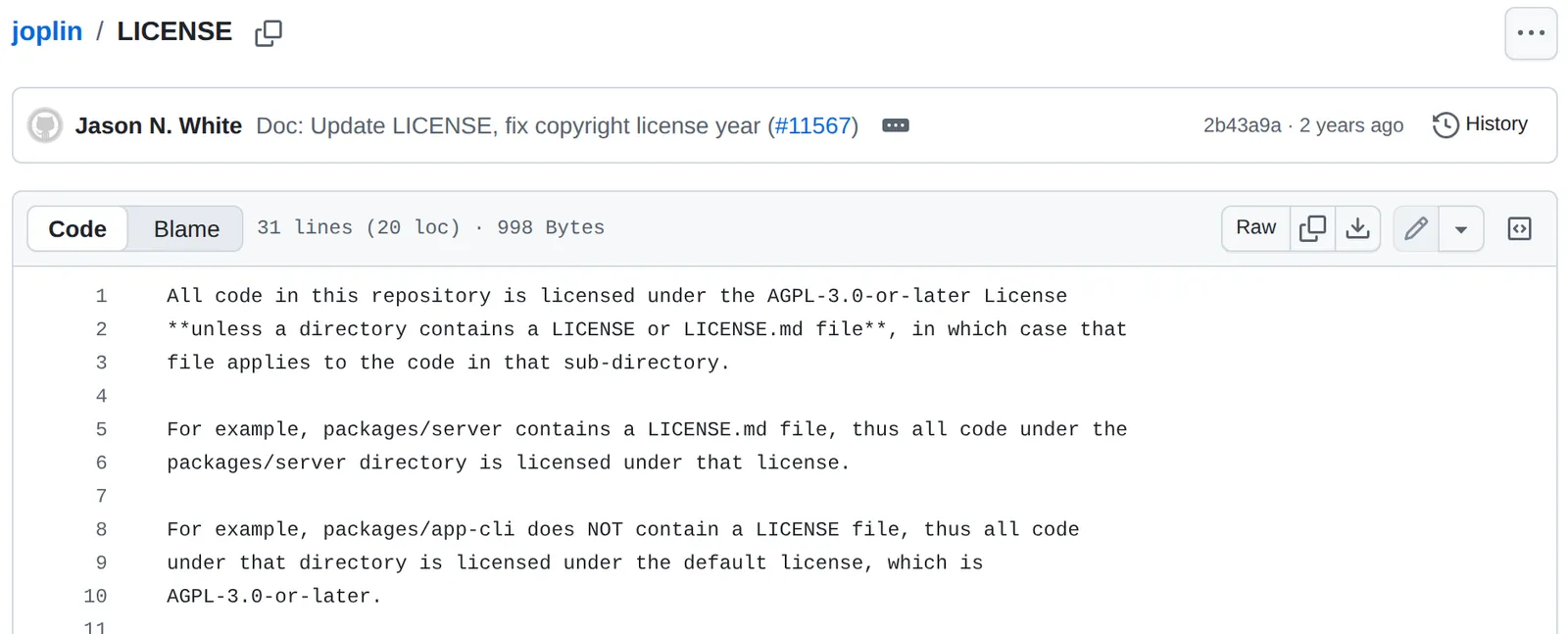 Joplin’s licence file on GitHub on 6 November 2026. Source: github.com
Obsidian and Anytype turn up in every “open source” list, and neither qualifies. Obsidian’s own repository says it “is not open source software” and holds no source code. Anytype publishes its desktop code under the Any Source Available License 1.0, a source-available licence rather than an open source one.
Open source notes apps compared
Every app below has its code on GitHub under an open source licence. “Phones” means an app from the project itself, not a third-party client, and the last column says what the sync runs through and whether you can host it yourself.
| App | App licence | Phones | Desktop | Notes are stored as | Sync, and its server |
|---|---|---|---|---|---|
| Joplin | AGPL-3.0 | Android, iPhone | Windows, Mac, Linux | A SQLite database | Dropbox, OneDrive, Nextcloud, WebDAV, S3, a folder, or Joplin Cloud; Joplin Server is non-commercial use only |
| Notesnook | GPL-3.0 | Android, iPhone | Windows, Mac, Linux, web | Encrypted, in its cloud | Its own, end-to-end encrypted; server AGPL-3.0, self-hostable without support |
| Standard Notes | AGPL-3.0 | Android, iPhone | Windows, Mac, Linux, web | Encrypted, in its cloud | Its own, end-to-end encrypted; server self-hostable |
| Simplenote | GPL-2.0 | Android, iPhone | Windows, Mac, Linux, web | On Automattic’s servers | Its own service, free |
| Logseq | AGPL-3.0 | iPhone (file version, last updated 2024) | Windows, Mac, Linux | Markdown or Org files | Any file sync; its own sync is in alpha |
| Trilium | AGPL-3.0 | None of its own | Windows, Mac, Linux, server | Its own database | A sync server you run, AGPL-3.0 |
| VB Notes | MIT | Android, iPhone | Windows, Mac, Linux | Plain .md files |
No server: iCloud Drive or a sync app moves the folder |
Markor and Zettlr come close but miss one side. Markor (Apache 2.0) keeps plain text files in any folder, but it’s Android only. Zettlr (GPL-3.0) is a desktop Markdown editor with no phone app.
Where your notes live matters more than the licence
If a project stops, open code lets someone carry it on. Your notes only come with you if they’re in a form other apps can read, so this is the column I’d look at first.
Joplin keeps everything in one file. Its profile documentation describes database.sqlite as “the central SQLite database file where all notes, notebooks, tags, and metadata are stored”. You can export to Markdown whenever you like, but you can’t point another app at Joplin’s notes as they sit.
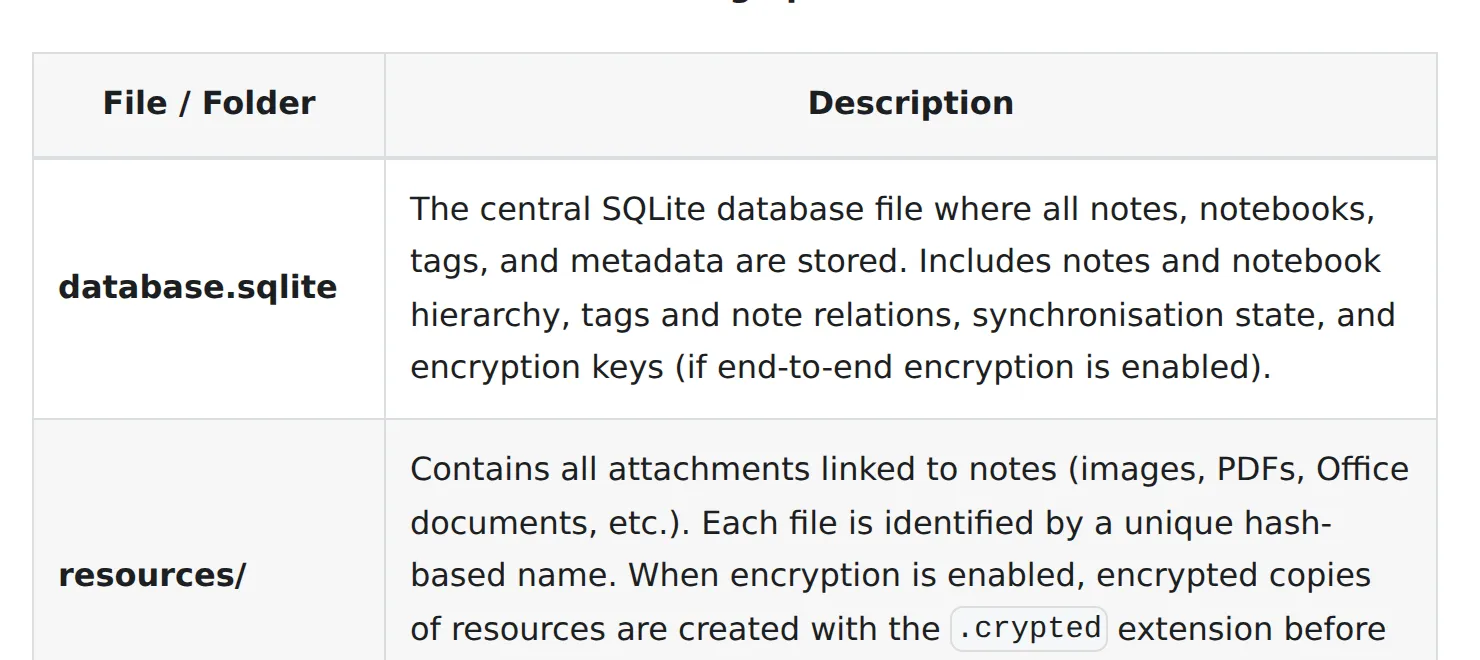 Joplin’s user profile documentation on 6 November 2026. Source: joplinapp.org
The encrypted apps are the opposite trade. Notesnook and Standard Notes hold your notes in a form only your password can read, which is the point, and both give you a full export. Notesnook’s export guide offers Markdown, HTML and plain text for all notes as a zip. Standard Notes’ decrypted backup includes a folder with each note as a plain text file.
Joplin: the default pick, with sync your way
Joplin has about 57,000 stars on GitHub and apps for every desktop and both phones, plus a web clipper for Firefox and Chrome. On Android it’s also on F-Droid, built and signed by F-Droid, if you avoid Google Play.
Its sync page lists Joplin Cloud, Nextcloud, S3, WebDAV, Dropbox, OneDrive and a local folder, so you can use storage you already pay for. End-to-end encryption is there, but you switch it on yourself, on one device first.
The catch is the database above, and an interface that feels more like a tool than a notebook. If you’re leaving Bear specifically, my open source Bear alternative comparison looks at Joplin’s missing nested tags.
Notesnook and Standard Notes: open source with encryption
Notesnook is GPL-3.0 and encrypts on your device with XChaCha20-Poly1305 and Argon2 before anything syncs. Its sync server is AGPL-3.0 and can be self-hosted, “but without support”, as the server’s README puts it.
The free plan has unlimited notes and devices, with 50 notebooks and 50 tags (Notesnook pricing).
Standard Notes is AGPL-3.0, on every desktop, both phones and the web, and its sync server can be self-hosted. The free plan syncs plain text notes on unlimited devices. Markdown, rich text and checklists come with the Super note type on Productivity, $90 a year.
Simplenote: the plainest one
Simplenote is made by Automattic, the company behind WordPress.com. The code for its Windows and Linux app is GPL-2.0, and the Mac, iPhone and Android apps have their own repositories. The apps, sync and backups are free on iPhone, Android, Mac, Windows, Linux and the web, says simplenote.com.
Its help page says Markdown works on the web, Android, Windows, Linux and iPhone apps, switched on per note. It also says notes are encrypted in transit but not at rest on its servers. Good for quick lists; not for anything private.
Logseq and Trilium: for outliners and self-hosters
Logseq (AGPL-3.0) is an outliner: every line is a block. The file version keeps your pages as Markdown or Org files, which makes it easy to leave. Its iPhone app was last updated to 0.10.9 in April 2024. The new database version is in beta, with its mobile app and sync in alpha, and the README warns that data loss is possible and recommends regular backups.
Trilium (AGPL-3.0) is a desktop and server app for a large personal knowledge base, synced through a server you run. On phones you use its mobile web view or a third-party client such as TriliumDroid or Trinote.
VB Notes: plain files on every platform
VB Notes is the open source app for someone who wants the notes to outlive the app. Every note is a plain .md file in a folder you choose, named after its first line, with no database and no account. Keep that folder in iCloud Drive, or in a sync app such as Syncthing on Android and Windows (Android sync guide), and the phone and desktop apps read the same files. Obsidian, a text editor or a script can open them too.
The code is MIT-licensed, covering the iPhone and Android app and the desktop app for Mac, Windows and Linux. All of it is free, with no account, and the iPhone app is on the App Store, the Android app on Google Play.
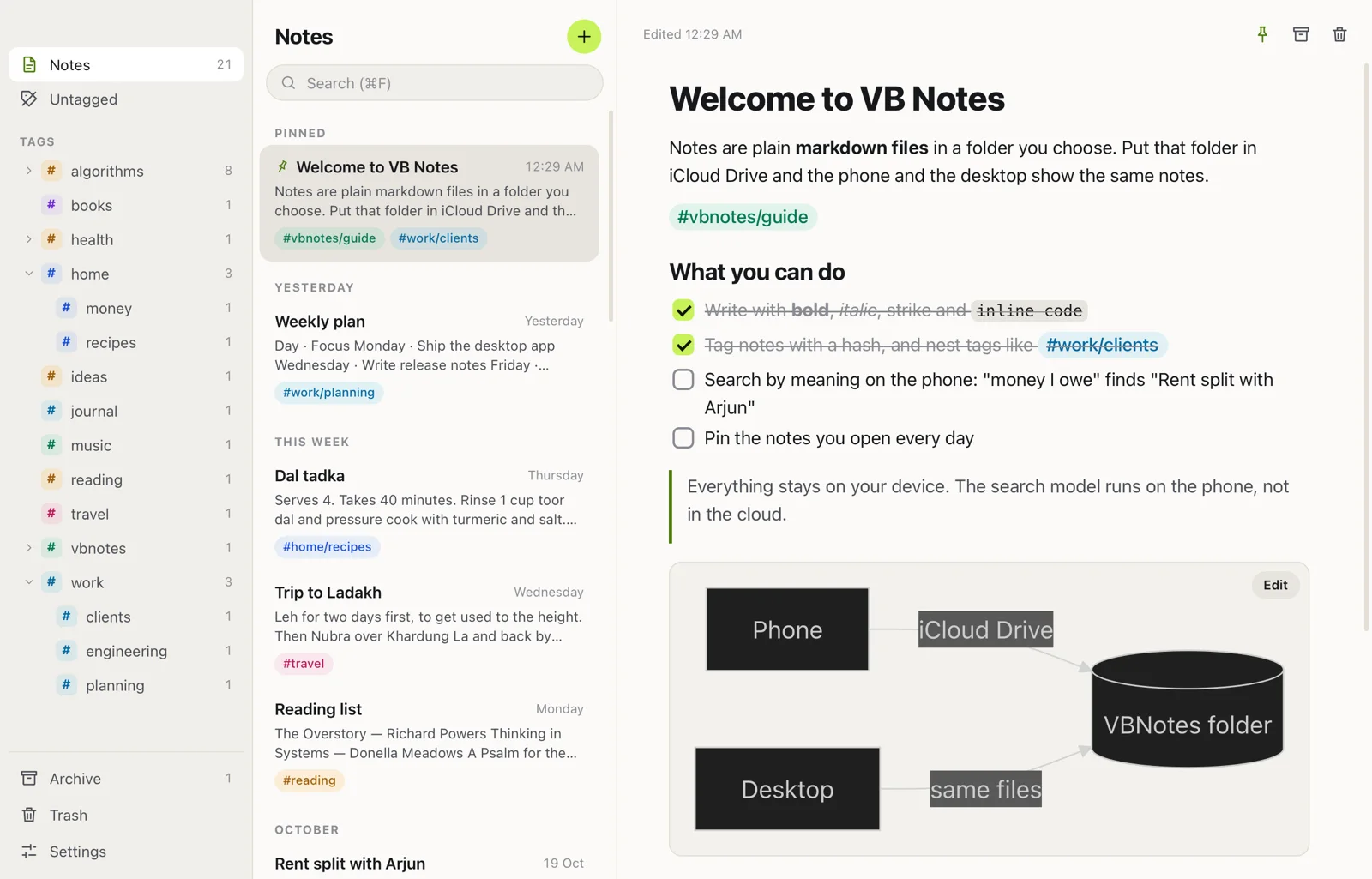 VB Notes on the desktop. Source: VB Notes docs
What it lacks: it’s young (version 0.4.12 came out on 5 November), built by one person and has 5 stars on GitHub. It has no sync service, no encryption of its own, no web app, no sharing and no plugins. On iPhone, Google Drive and Dropbox folders can’t be picked, so plan how the folder gets between your iPhone and a Windows PC.
FAQ
What is the best open source notes app for Android?
Joplin for most people: it has an Android app, also on F-Droid, and syncs with Dropbox, OneDrive or Nextcloud. Notesnook and Standard Notes if you want end-to-end encryption, and VB Notes if you want plain .md files kept in step by a sync app such as Syncthing.
Which open source notes app has sync?
Joplin, Notesnook, Standard Notes and Simplenote all sync for free. Notesnook and Standard Notes encrypt end to end, Joplin can once you switch it on, and Simplenote doesn’t. VB Notes leaves sync to the folder, through iCloud Drive or a sync app.
What is the best open source notes app for Windows?
Joplin covers the most, with sync and a web clipper. VB Notes suits you if you want the notes as plain .md files another editor can open, and Zettlr if you only write on the computer. Standard Notes and Notesnook both have Windows apps if you want encryption.
Is Obsidian open source?
No. Its own GitHub repository says it isn’t open source software and contains no source code. It’s free to use and stores plain Markdown files, which is why it’s often listed anyway.
Where can I find open source notes apps on GitHub?
All of the apps in the table above publish their code there: laurent22/joplin, streetwriters/notesnook, standardnotes/app, Automattic/simplenote-electron, logseq/logseq, TriliumNext/Trilium and elavneet/vbnotes.com.
Which one to pick
If you want a web clipper and the widest choice of sync services, Joplin is the safe choice, with a community large enough to last. If privacy is why you’re looking, take Notesnook or Standard Notes and accept the export step. If you’d rather your notes be files first and an app second, try VB Notes or Logseq’s file version, and keep the folder backed up like any other files you care about.