
Bear Notes for Android: No App, and What to Use Instead
Disclosure: VB Notes is my app. I’ve tried to be fair, and I say where the others are the better choice.
There is no Bear notes app for Android, and Bear says it has no plans to make one. Your options are Bear Web in a phone browser, which is a beta and needs Bear Pro to sync, or an Android app that reads your Bear notes once you export them as Markdown. Obsidian is the most established pick. UpNote looks the most like Bear but keeps notes in its own cloud. VB Notes, my app, has a Bear-style editor, is free on Google Play and reads Bear’s multi-word tags as they are. Whichever you choose, check how it handles Bear’s multi-word tags before you move.
Is there a Bear app for Android?
No. Bear’s FAQ on web, Android and Windows says Shiny Frog, the company behind Bear, has no plans for Android or Windows. Bear’s home page lists Mac, iPhone and iPad, nothing else. The July 2025 Bear Web announcement hoped to bring Bear to “more devices, including Windows and Android”, but the FAQ still says no plans.
Nothing syncs live between Bear and an Android app. Exporting is a one-time move, so if you keep a Mac or iPhone with Bear on it, Bear Web is the only way to edit the same notes on both.
Bear Web in an Android browser
Bear Web is the only way to open your actual Bear notes on an Android phone. You go to web.bear.app and sign in with your Apple ID. The FAQ says it works “from any web browser”, syncs through iCloud, and won’t work if Apple’s Advanced Data Protection is turned on.
The catches matter more on a phone than on a laptop:
- It’s a beta, and the announcement asks you not to use it for critical work.
- Pro isn’t needed for the beta, but syncing with the Bear apps on your Mac or iPhone is. Pro costs $2.99 a month or $29.99 a year in the US.
- Bear says it’s meant to complement the Apple apps, not replace them, and TagCons and encryption are still in development.
Bear’s tenth birthday post on 3 November 2026 says Bear Web is almost ready for its full release. If you only glance at notes on Android now and then, waiting for that may be the simplest answer.
Getting your Bear notes onto Android
Every Android option except Bear Web starts with an export. Markdown export is free in Bear, no Pro needed:
- On a Mac, turn on “Keep tags during export” under Bear > Preferences > General first. Then click Notes in the sidebar, press ⌘A, choose File > Export notes… and pick Markdown.
- On an iPhone, select Notes in the sidebar, tap the Notes heading with the arrow at the top, and tap Export….
You get Markdown files with your tags written in the text. Save the export into a cloud drive folder, or anywhere your computer can sync to the phone, and point the Android app at it. That’s where the snag is. Bear lets a tag hold spaces if you close it with a second hash.
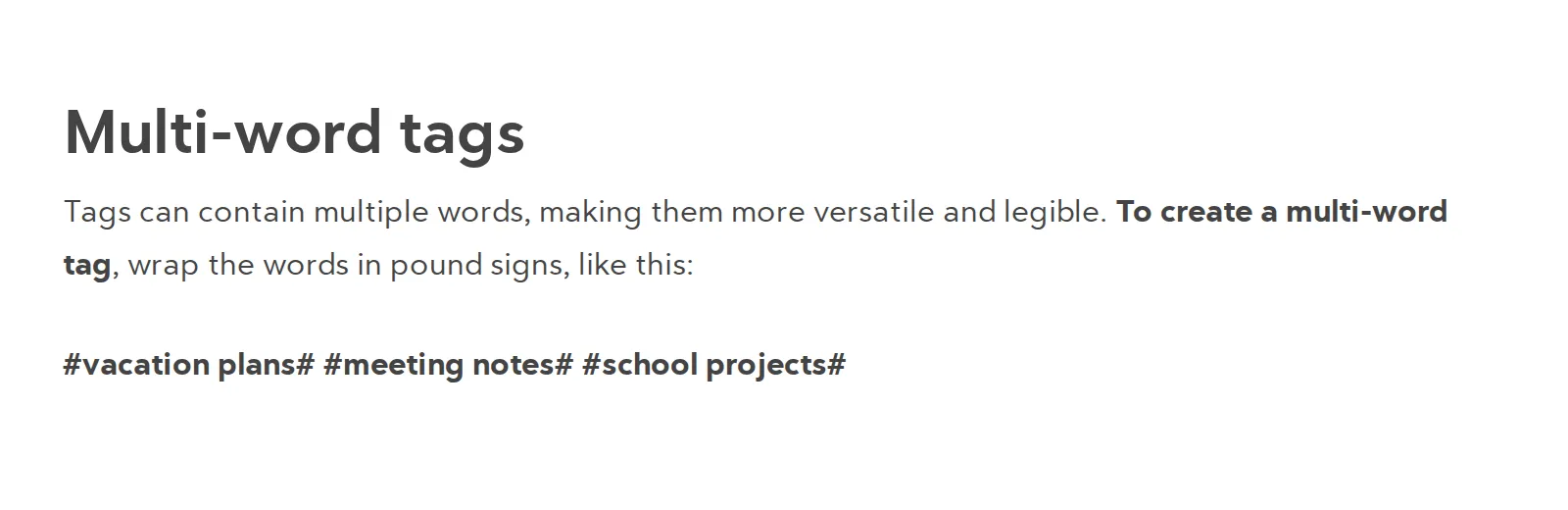 The multi-word tags section of Bear’s tag guide on 5 November 2026. Source: bear.app
Most other apps don’t read that. Obsidian’s tag rules say plainly that tags can’t contain blank spaces, and suggest #camelCase or #kebab-case instead (Obsidian help). UpNote’s tag guide says the same: letters and numbers, but not spaces.
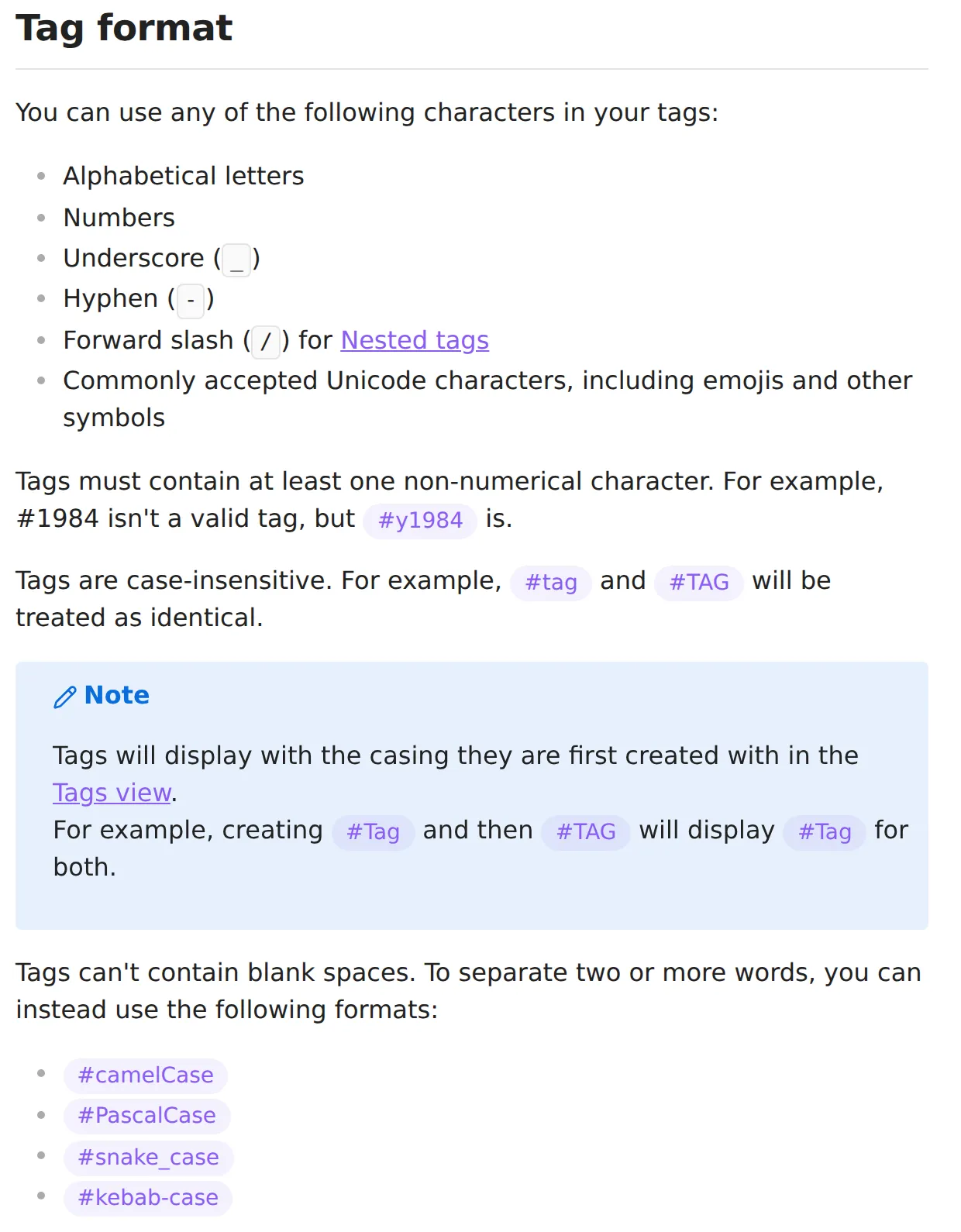 The tag format section of Obsidian’s help on 5 November 2026. Source: obsidian.md
So a note tagged #meeting notes# in Bear won’t land in a meeting notes tag in those apps. If you use many multi-word tags, rename them in Bear to #meeting-notes before you export, or pick an app that reads Bear’s form.
Bear notes alternatives for Android compared
These are the apps a Bear user is most likely to settle on. Prices were checked on 5 November 2026 and are US prices.
| App | On Google Play | Editor | Bear’s #a/b tags |
#two words# tags |
Notes are | Cost |
|---|---|---|---|---|---|---|
| Bear Web | No, a browser | Bear’s, beta | Yes | Yes | In Bear, on iCloud | Beta free, sync needs Pro at $29.99 a year |
| VB Notes | Yes | Bear-style, formats as you type | Yes | Yes | Plain .md files |
Free |
| Obsidian | Yes | Live Preview | Yes | No | Plain .md files |
Free, Sync from $4 a month |
| UpNote | Yes | Rich text with Markdown support | Not in its tag guide | No | In UpNote’s cloud | 50 notes free, $1.99 a month or $39.99 once |
| Markor | Yes, and F-Droid | Markdown text editor | No tag browser | No tag browser | Plain files | Free, open source |
VB Notes: Bear’s editor and tags on Android
VB Notes reads a Bear export as it is. #work/clients nests under work, a tag with spaces closed by a second hash, such as #reading list#, stays one tag, and links are written [[Note title]], as Bear writes them. Formatting shows as you type, checklists tick with one tap, and the file stays plain Markdown.
The Android app is on Google Play, with no account, no ads and no in-app purchases. It keeps notes in a folder on the phone, and a sync app keeps that folder in step with Google Drive, Dropbox, OneDrive or your computer.
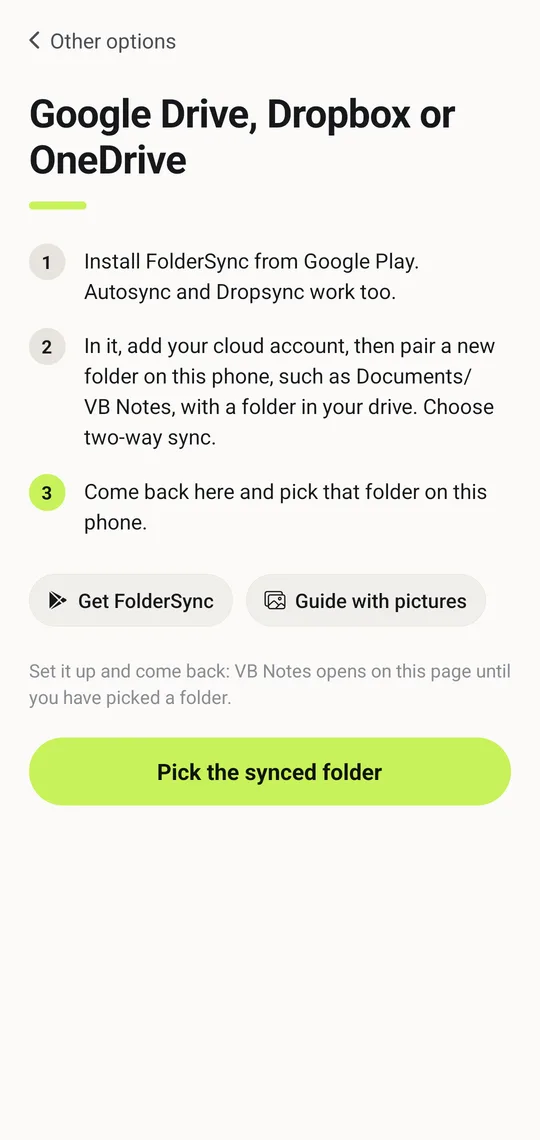 VB Notes guiding sync on Android. Source: VB Notes docs
On a computer, drag the exported folder onto the notes list in the desktop app; it copies the notes and the pictures they show. Then sync that folder to the phone with FolderSync through a cloud drive, or with Syncthing straight over Wi-Fi.
Know what’s missing before you move. There’s no web app, no iPad-specific version, no backlinks panel, no encryption of its own and no reminders, and it’s built by one person. The code is open source under the MIT licence, and your notes are plain files whatever happens to the app.
Obsidian: the safe pick
Obsidian is free without limits and needs no sign-up. Its Android app works on a local folder of plain Markdown files. Live Preview, the default editing view, shows formatting inline and hides most of the Markdown, which is the nearest thing to Bear’s feel. Nested #a/b tags work as in Bear.
You can skip the Markdown export entirely. Obsidian’s Bear importer reads a Bear backup, made on a Mac with File > Backup notes. Multi-word tags still need renaming, because Obsidian can’t hold them.
Sync is where Obsidian costs money. Obsidian Sync is $4 a month billed yearly, or $5 monthly. The free routes are rougher on Android: Obsidian’s sync guide lists Google Drive as recommended there but not officially supported, says OneDrive may not work well, and notes that the official Syncthing Android app is no longer maintained, pointing to the community fork Syncthing-Fork instead.
UpNote: the closest look, in its own cloud
UpNote runs on Android, iPhone, Mac, Windows and Linux, and has the clean, Bear-like look many people want. It has hashtags and nested notebooks, Markdown support in a rich text editor, and offline editing. The free plan stops at 50 notes. Premium is $1.99 a month or $39.99 once, and one purchase carries over to your other devices once you sign in.
The trade is storage. UpNote’s FAQ says notes are stored and synced through Firebase, a Google service, on servers in the US, with no end-to-end encryption and no iCloud sync. It also has no nested tags in its tag guide, so Bear’s #work/clients becomes a notebook question.
Markor: plain Markdown, no frills
Markor is an open source Markdown and to-do editor for Android under the Apache 2.0 licence. It works offline on plain files in a folder you choose and doesn’t sync by itself; its README suggests Syncthing. It’s on F-Droid and Google Play, though the Play version was last updated in March 2025. It’s an editor rather than Bear’s library of tags, so it suits people who mostly write and rarely browse.
FAQ
Is Bear notes available for Android?
No. Bear’s FAQ says Shiny Frog has no plans for Android or Windows. Bear Web, a browser version in beta, is the only way to open Bear notes on an Android phone.
Can I use Bear on Android through the browser?
Yes, at web.bear.app with your Apple ID. It’s in public beta, won’t work with Advanced Data Protection on, and needs Bear Pro to sync with your Bear apps on Mac or iPhone.
What is the best Bear notes alternative for Android?
Obsidian if you want the most established app and plain files, and UpNote if you want Bear’s look and don’t mind its cloud. VB Notes if you want Bear’s editor and its #a/b and #two words# tags on plain files, for free.
How do I move Bear notes to an Android phone?
Export all notes as Markdown from Bear, which is free, with “Keep tags during export” on. Put the folder in a cloud drive or sync it with Syncthing, then open it in a Markdown app on the phone.
Before you leave Bear
If Android is a second phone you rarely write on, Bear Web is close to its full release and keeps everything in one place. If you’re switching to Android for good, export once and pick by tags: rename multi-word tags for Obsidian or UpNote, or bring them as they are to VB Notes. Windows too? My Bear alternatives for Windows post covers that side.