
Chat with AI
Ask an AI about one note or all your notes, with your own account at OpenRouter, OpenAI, Anthropic, Google and others. What is sent, and when.
VB Notes can chat with an AI about the note in front of you, or about all your notes. It is off until you turn it on, and it uses your own account with the provider you pick. VB Notes has no AI service of its own.
Turning it on
Open Settings › AI chat and switch on Chat with AI. Then:
- Pick a provider: OpenRouter (one key for models from many companies), OpenAI, Anthropic, Google Gemini, Groq, Mistral, DeepSeek or xAI. The desktop app also offers Ollama, for a model running on your own computer. Other takes any server that speaks the OpenAI API, at the address you give.
- Paste your API key. Settings links to the page where each provider gives you one.
- Pick a model. The list comes from the provider, and VB Notes picks a sensible one to start with.
Asking
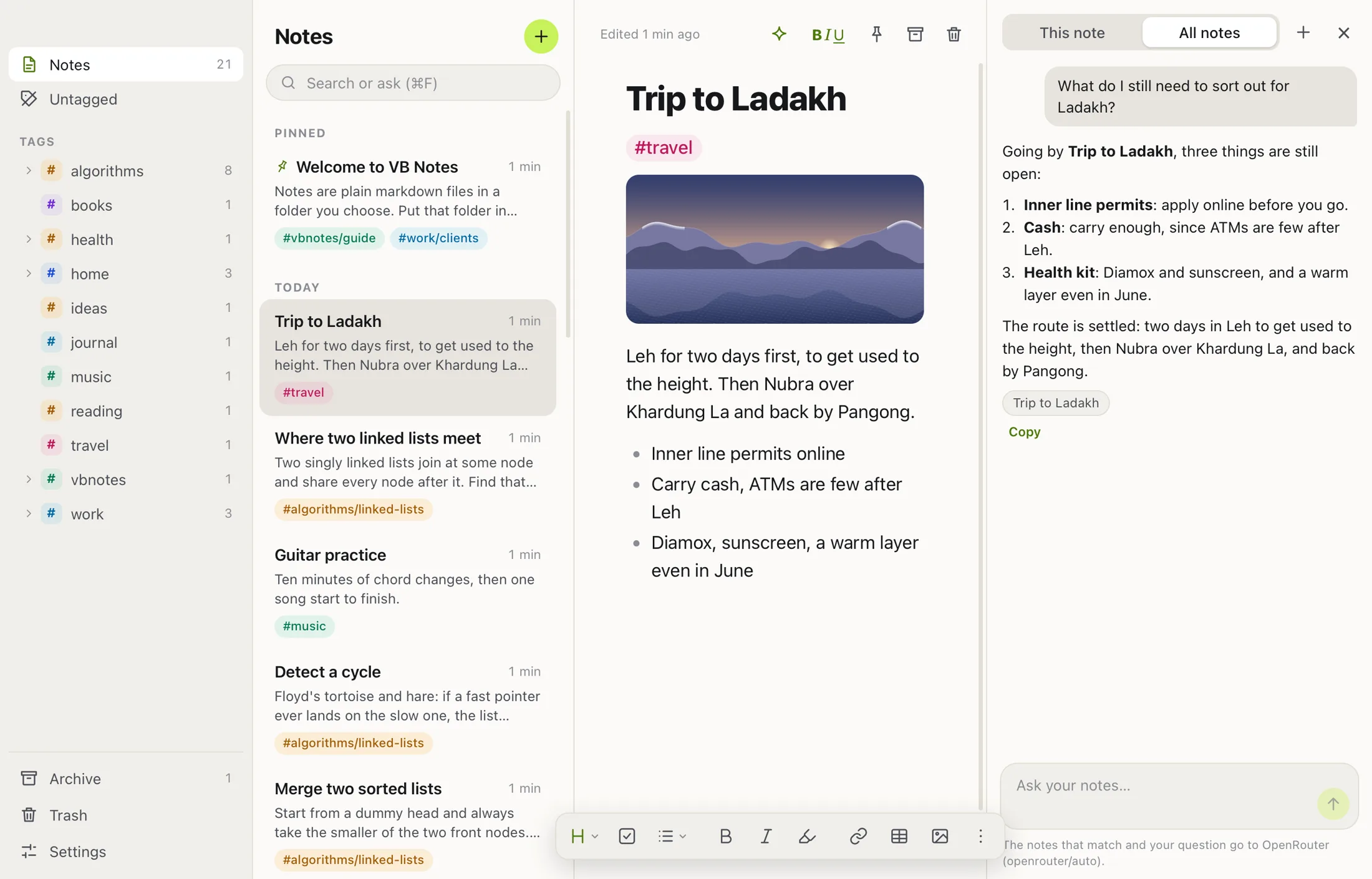
- On the desktop: click the sparkle button over a note, or press ⇧⌘J (Ctrl+Shift+J). Choose This note or All notes at the top of the chat.
- On the phone: tap the sparkle beside ⓘ at the top of a note to ask about that note. For all your notes, tap the sparkle beside Settings in the library, or type a question in Search and tap Ask AI.
With All notes, VB Notes looks for the notes that fit each question, with the same search as the app, and sends only the parts of them that bear on it. Notes with a tag in Settings › Hide from Notes are left out. The notes the answer used show under it; tap or click one to open it.
What it costs
You pay your provider for what you use, under your own account. With OpenRouter, VB Notes can show the cost exactly: each answer shows what it cost, and Settings › AI chat shows what you’ve spent in VB Notes this month, plus your key’s own totals and what’s left on it. Other providers report how much text was used but not the price, so VB Notes doesn’t guess.
The model makes the biggest difference. A small model such as Claude Haiku answers questions about notes well, for a fraction of what a large one costs.
What is sent, and when
- Only when you ask a question: the question, the conversation so far, and the note you are asking about (or the notes that matched), to the provider you picked.
- The provider handles what it receives under its own terms and privacy policy. VB Notes never sees it.
- Your API key stays on your device: in the app’s own settings on the desktop, and in the Keychain or the Android keystore on the phone. It is never written to your notes folder, so it doesn’t sync to your other devices.
- Turned off, nothing is ever sent.